5 Best AI Interior Design Tools in 2026 (Real Prices, Honest Picks)
We narrowed AI interior design tools to the 5 worth trying in 2026: Spaceora, Interior AI, REimagineHome, Collov and Spacely. Compare free tiers, real prices and what each does best.

TL;DR
- Spaceora: best overall for homeowners, and the one pick that also plans your yard with plants filtered by USDA hardiness zone. 3 free redesigns when you sign up, paid plans from $19.90/month.
- Interior AI: best for high volume. Pro is $49/month or $390/year for 1,000 designs a month (as of Oct 2026, per its site). No free plan listed.
- REimagineHome: best free trial for staging, with 5 free designs at the same quality as paid plans.
- Collov AI: best for brokerages and listing volume, from $19/month billed yearly (as of Oct 2026, per its pricing page).
- Spacely AI: best for designers working in SketchUp, Revit, AutoCAD or Rhino. 40 free trial credits, no card needed.
The short answer
The best AI interior design tool for most homeowners in 2026 is Spaceora. It restyles a room from one photo, takes plain-word edits on paid plans, and also does virtual staging and backyard, garden and landscape design with plant suggestions filtered by your USDA hardiness zone. If you render hundreds of images a month, Interior AI costs less per image. If you stage listings for a living, REimagineHome or Collov AI fits better.
Why only five?
Most rankings for the best AI interior design tools list 9 to 11 apps. Every price and limit below comes from the vendor's own site. A long list makes the choice harder, not easier. We picked five tools that each do one job well, and we told you which job.
One thing to sort out first. A photo restyle app takes a picture of your room and repaints it in a new style, usually in about a minute. 3D or CAD software builds a model with real measurements. This list covers the first kind, plus one tool (Spacely) that bridges into CAD work.
The 5 best AI interior design tools at a glance
Prices checked October 2026 on each vendor's own site. Confirm before you buy; these change often. The structure column quotes each vendor's own marketing, not our test.
| Tool | Best for | Free option | Paid from | Structure claim (vendor's own wording) | Edit after render | Virtual staging | Outdoor / garden | Platforms |
|---|---|---|---|---|---|---|---|---|
| Spaceora | Homeowners, plus yards | 3 free redesigns when you sign up, watermarked | $19.90/mo | No claim; see our before/afters below | Yes, paid plans | Yes | Yes, zone-filtered plants | Web browser |
| Interior AI | High volume | None listed | $49/mo ($390/yr) | Claims "maintains construction" in 3D Vision mode | Yes, Premium ($99/mo) | Yes, Premium | Outdoor design mode | Web browser |
| REimagineHome | Free staging trial | 5 designs | $14/mo | Claims "structural integrity" | Yes, Pro plan | Yes | Basic landscaping | Web browser |
| Collov AI | Brokerages | 5 watermarked trials | $19/mo billed yearly | Not stated | Chat edit from $49/mo (yearly) | Yes, with one-click disclaimer | Lawn, season, twilight edits | Web browser |
| Spacely AI | Designers, CAD | 40 trial credits | Subscription (see pricing page) | Not stated | Yes (Auto Edit) | Yes (Auto Furnish) | Creative Landscape | Web, SketchUp extension |
How we chose and tested
We started from the tools that appear again and again across the top-ranking lists, kept only dedicated interior design tools with public pricing, and made sure no two picks do the same job. ChatGPT and Gemini didn't make the list because they're general chat tools, and 3D planners are a different category (more on both below).
Pricing for every tool was checked on its official site on October 21, 2026. We ran our own renders only in Spaceora, on October 21, 2026, using free Unsplash photos, Lite-tier settings (about 2K, no watermark) and a single run per image with no cherry-picking. We don't show competitor output: we'd rather point you to their sites than show screenshots we can't vouch for.
1. Spaceora: best overall for homeowners (and the only one that designs your garden by zone)
Spaceora is a browser app that redesigns a room, stages an empty listing or replans a yard from one photo. It fits homeowners and renters planning a refresh, and agents who also need staging.
Your room, not a stock room
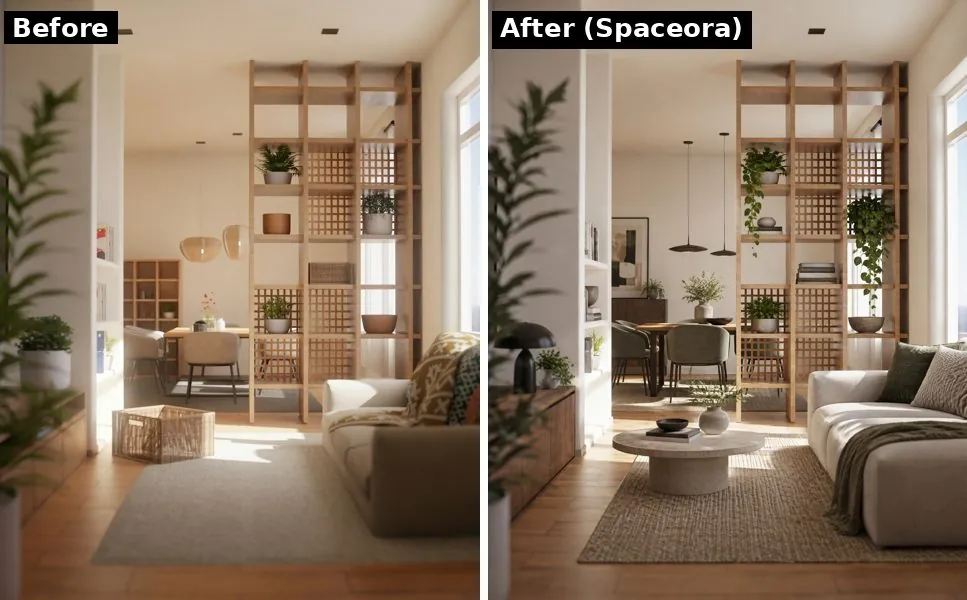
Spaceora, Modern style, single run, generated October 21, 2026. Photo: Puscas Adryan / Unsplash
We'd rather show you than promise. Look at the windows, walls and wooden room divider in both halves and judge for yourself. Like every AI image tool, Spaceora can change details you didn't ask about, so spend your 3 free redesigns on your hardest photo. Each render took about a minute.
Edit in plain words
On paid plans you can ask for a change in a sentence, like "make the sofa green" or "keep the rug", instead of rolling a whole new image. The free tier doesn't include edits; it regenerates the full image.
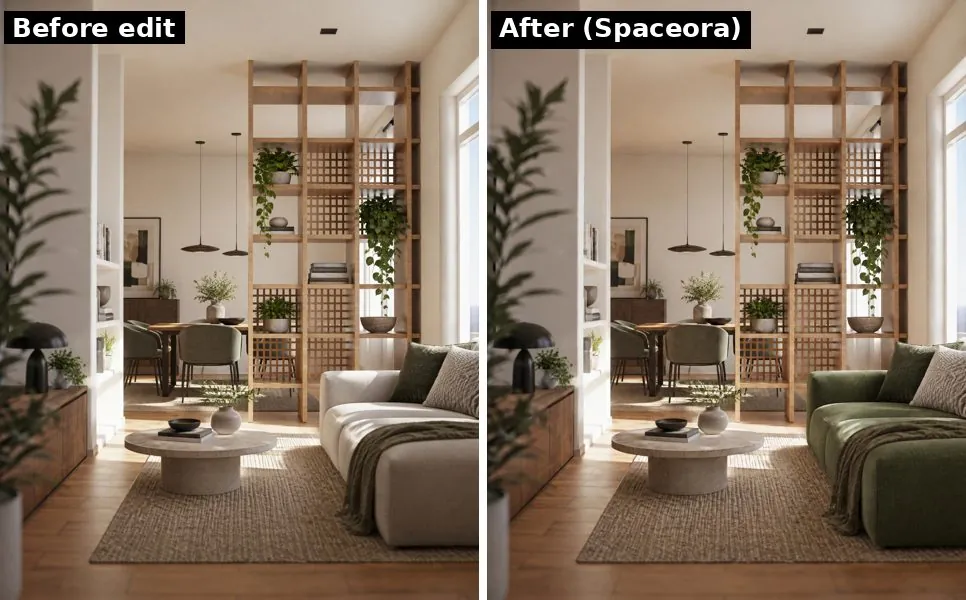
One plain-words edit on the redesign above. Generated October 21, 2026. Photo: Puscas Adryan / Unsplash
Virtual staging for listings
Upload an empty room at spaceora.app/virtual-staging and get it furnished. You own the images and can use them commercially on every plan, free included. Two rules: label staged photos as virtually staged (NAR's Standard of Practice 12-5 expects it, and so do Spaceora's terms), and don't remove the watermark on free images. Weighing it against a human stager? See virtual staging cost vs. traditional staging.
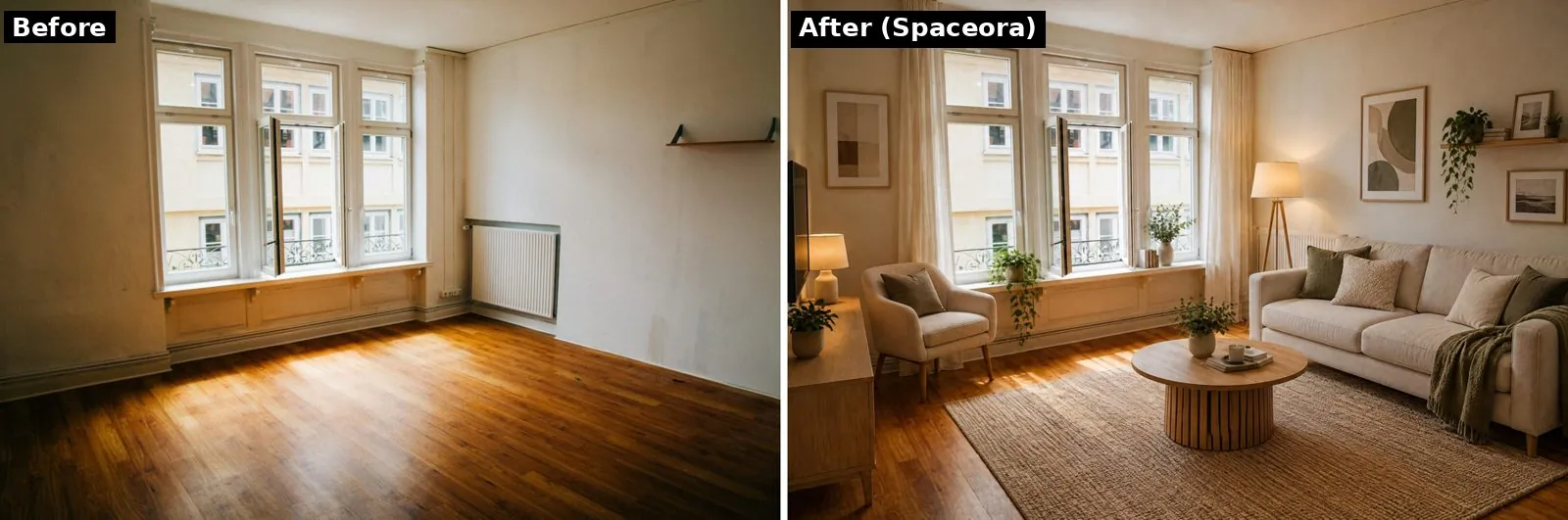
Spaceora virtual staging, Modern style, single run, generated October 21, 2026. Photo: Christian Lue / Unsplash
Yard, garden and landscape with USDA zone filtering
None of the other four tools here filters plants by climate. Spaceora redesigns backyards, gardens and full landscapes, and filters plant suggestions by USDA hardiness zone, so a Minnesota yard doesn't get a lemon tree. Look up your zone with the free hardiness zone finder.
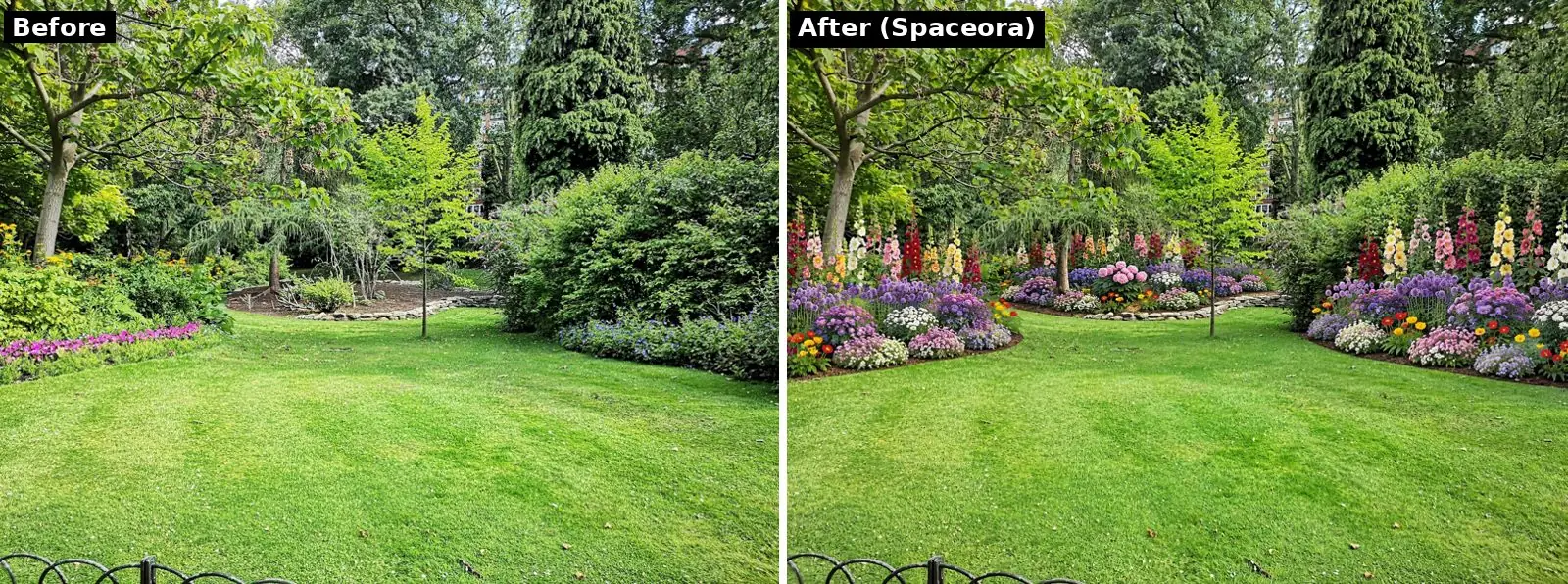
Spaceora garden design, Modern style, example inputs: 20 × 30 ft, full sun. Generated October 21, 2026. Photo: Pankaj Shah / Unsplash
Pricing
| Plan | Monthly | Generations per month | Output |
|---|---|---|---|
| Free | $0 | 3 free redesigns when you sign up, not monthly | 1248×832, watermarked |
| Lite | $19.90 | 30 | 2K (2352×1568) |
| Pro | $39.90 | 80 | Around 4K (3520×2352) |
| Max | $79.90 | 120 | Around 4K, highest quality |
Paying yearly takes 25% off (Lite $179.10, Pro $359.10, Max $719.10 per year). It's a subscription; there's nothing to buy per room. Every plan, free included, allows commercial use. Failed or timed-out renders refund their credits automatically. Details on the pricing page.
Limitations
- Small free tier. You get 3 free redesigns when you sign up, and they don't refill.
- No edits on free. Plain-word edits need a paid plan.
- Sign-in required before your first render (Google sign-in works).
- Subscription only. No pay-per-room option, so a one-off single room costs a month of Lite.
- Web only. Works in a phone browser, but there's no app to download.
- Your photo goes to a third party. Spaceora sends photos to its image provider, WaveSpeed, to make the render. You can delete your images from Spaceora's storage, but Spaceora can't delete the provider's copy.
Verdict: the best pick if your project might grow into staging or the yard. If you only want one quick render ever, a cheaper credit pack elsewhere may make more sense.
2. Interior AI: best for high volume
Built by indie developer Pieter Levels, Interior AI offers 55+ styles and modes for interiors, virtual staging, sketches, SketchUp screenshots and outdoor spaces. It suits people who render a lot: designers exploring options, or agents with many listings.
Pricing (as of Oct 2026, per interiorai.com): Pro $49/month for 1,000 designs a month, or $390/year billed yearly. Premium is $99/month and Ultra $199/month.
Downsides: no free plan is listed. Pro gives low-quality renders; editing, virtual staging and medium-quality renders start on Premium. Its FAQ says there are no refunds.
Verdict: the lowest cost per image here if you'll actually use hundreds of renders. Overkill for one living room.
3. REimagineHome: best free trial for staging
REimagineHome covers interior redesign, staging, exterior edits and landscaping for homeowners and agents. Its 5 free designs use the same AI and quality as paid plans, per its pricing page, which makes it a fair test.
Know the plan gap: the entry Essential plan (30 credits a month) uses "legacy tools" with no conversational editing, no reference photos and no high-resolution next-gen output. Pro (200 credits) adds chat-style editing, step-by-step changes without starting over, real shoppable products and listing batch processing. Most of what makes it stand out sits in Pro.
Pricing: $14–$99/month as of Oct 2026; confirm plan amounts at reimaginehome.ai/pricing before you subscribe. One generation uses one credit.
Downside: outdoor support on Essential is basic landscaping and exterior edits, with no plant guidance by climate.
Verdict: start here if you want to test staging on real listing photos before paying, then decide whether Pro is worth it.
4. Collov AI: best for brokerages and listing volume
Collov AI is a virtual staging tool built for agents, teams and brokerages, with listing-photo extras like twilight conversion, lawn replacement and season changes.
Pricing (as of Oct 2026, per collov.ai/pricing, billed yearly): Standard $19/month ($228/year), Advanced $49/month ($588/year), Premium $79/month ($948/year), Enterprise $127/month ($1,524/year).
Strengths: a one-click virtual staging disclaimer and a furniture removal tool on Standard. Chat edit and photo editing from Advanced; 3D tour and virtual tour features from Premium.
Downsides: the 5 free trials are watermarked, and the most useful editing sits above the entry plan. It's built for listings, not remodel planning.
Verdict: the strongest fit for an office staging listings every week, especially if you want the disclosure handled for you.
5. Spacely AI: best for designers and CAD workflows
Spacely AI is a rendering platform for interior designers and architects. It offers a SketchUp extension, plus Revit, AutoCAD and Rhino integrations on higher plans, and tools like Auto Furnish, Auto Edit, Empty the Room and Creative Landscape.
Free option: 40 trial credits with no credit card, per Spacely. They don't refill.
Pricing: Personal, Studio and Agency plans, plus 200-credit top-ups for $9 once you subscribe (as of Oct 2026, per its pricing page). Plan prices weren't shown on the page when we checked, so confirm there.
Downside: more tool than a homeowner needs to restyle one bedroom.
Verdict: the pick if your work starts in a 3D model and ends in a client presentation.
What about 3D planners and ChatGPT?
They're useful, just a different job. Homestyler, Planner 5D and IKEA Kreativ build floor plans or place products with real dimensions, which tells you whether the sofa fits but looks less like a photo. ChatGPT and Gemini can edit room photos too, but they aren't built around room types, styles, staging rules or batch work. Pair a planner with one of the five above when you need both measurements and a realistic picture.
How to choose an AI interior design tool
Answer five questions and the list sorts itself:
- Does it need to look like my actual room? Run the same photo through two tools and keep the one whose windows and walls still match.
- Will I want to tweak one detail? Check which plan unlocks editing; on most tools here it sits on a paid plan.
- How many images do I need? One room: use free trials. Hundreds a month: Interior AI.
- Is this for a listing? Pick a tool that makes disclosure easy (Collov's one-click disclaimer) and label every staged photo.
- Does the project go outside? Spaceora filters plants by USDA zone; Interior AI, REimagineHome, Collov and Spacely offer outdoor edits without that climate filter.
Planning a bedroom? Browse ideas first: Japandi, Scandinavian or small bedroom designs.
FAQ
What is the best AI interior design tool in 2026?
For most homeowners, Spaceora. It restyles a room from one photo, takes plain-word edits on paid plans, and also handles virtual staging and yard or garden design with plants filtered by USDA hardiness zone. It runs in the browser, you get 3 free redesigns when you sign up, and paid plans start at $19.90/month. For very high volume, Interior AI costs less per image.
Which AI interior design app is free?
None is free without limits. Spaceora gives 3 free redesigns when you sign up (watermarked, commercial use allowed), REimagineHome gives 5 free designs, Spacely AI gives 40 trial credits, and Collov AI gives 5 watermarked trials. Interior AI lists no free plan. Credits are spent at different rates on each tool, so check what one image costs.
Which AI tool keeps my room's walls and windows?
No AI image tool guarantees it. Interior AI and REimagineHome market structure-keeping modes, but any image model can move a window or bend a wall. Test the same photo in two tools and keep the result that still looks like your room.
What's the best AI interior design tool for real estate virtual staging?
REimagineHome (5 free designs) and Collov AI (from $19/month billed yearly, with a one-click staging disclaimer) are built for listings. Spaceora also stages empty rooms. Whatever you use, NAR's Standard of Practice 12-5 expects you to disclose virtually staged photos.
How much do AI interior design tools cost?
As of October 2026: Spaceora from $19.90/month (25% off yearly), Interior AI from $49/month or $390/year, Collov AI from $19/month billed yearly, and Spacely AI on subscription plans (top-ups from $9 for 200 credits once subscribed). REimagineHome runs $14 to $99/month.
Can AI design my backyard or garden too?
Yes. Spaceora redesigns backyards, gardens and landscapes from a photo and filters plant suggestions by USDA hardiness zone. Interior AI, REimagineHome, Collov AI and Spacely AI also offer outdoor or landscape edits.
AI interior design app vs software: what's the difference?
An AI interior design app restyles a photo of your room into a new look. Interior design software like Planner 5D or SketchUp builds a 3D model with real measurements. Apps are faster for ideas; software is better for checking what fits.
Try it on your own room
Don't choose from screenshots, ours included. Take a photo of the room you want to change, run it through Spaceora's AI interior design tool (you get 3 free redesigns when you sign up), then try the same photo in one other tool from this list. Keep whichever result still looks like your home.