Best RoomGPT Alternative (2026): 7 AI Room Design Tools Compared
Looking for a RoomGPT alternative? Compare Spaceora, Interior AI, REimagineHome, Collov and more for redesigns, virtual staging and backyard design, with 2026 prices.
TL;DR
- Spaceora: best overall if you want one tool for rooms, listings and yards. 3 free redesigns when you sign up, paid plans from $19.90/month.
- Interior AI: the most styles (55+) and modes. No free plan listed; from $49/month (as of Oct 2026).
- REimagineHome: a generous free trial (5 designs) for trying out staging. Plans $14–$99/month (as of Oct 2026).
- Collov AI: listing staging with a watermarked trial, from $19/month billed yearly (as of Oct 2026).
- Spacely AI: designers and commercial projects, 40 free trial credits.
- MeltFlex / Roomellow: when you want furniture you can actually buy.
- Planner 5D / IKEA Kreativ: when you need real measurements instead of a picture.
The short answer
The best RoomGPT alternative for most homeowners is Spaceora. It redesigns a room from one photo, lets paid users ask for changes in plain words instead of re-rolling the whole image, and covers two jobs RoomGPT doesn't: virtual staging for listings and yard, garden and landscape design with plants matched to your USDA hardiness zone. You get 3 free redesigns when you sign up, so you can test it on your own photos before you pay anything.
RoomGPT is fine for a quick themed concept of one room. You usually leave it for one of five reasons: the render changed more of the room than you wanted, you can't fix one detail without starting over, the price only shows up after you sign in, the style list is short, or you need the yard done too. This guide matches a tool to each of those problems, with honest downsides for every one, including ours.
Quick answer: the best RoomGPT alternative for each job
- The render changed too much of your room: try Spaceora and Interior AI on the same photo and compare. Results vary a lot by photo, so test before you buy credits anywhere.
- You want to fix one detail, not regenerate everything: Spaceora's paid plans let you describe the change ("warmer lighting", "keep the rug").
- You're staging an empty listing: Spaceora, REimagineHome or Collov.
- You need the backyard, garden or curb appeal: Spaceora, if you want plant suggestions matched to your USDA zone. Interior AI, REimagineHome and Spacely also have outdoor or landscape modes.
- You want to buy the exact furniture you see: Roomellow or MeltFlex.
- You need a floor plan with real dimensions: Planner 5D or IKEA Kreativ.
Why people look for a RoomGPT alternative
Most people switch because of what happened to their room in the render, or because of how credits get spent fixing it. Here's what comes up most often.
It changes your room's architecture
Some users report that the AI redraws the room itself: a window disappears, a wall bends, or the output looks like a different house.
To be fair, this problem isn't unique to RoomGPT. Every image model in this list can change parts of a room you didn't ask it to touch. That's why the best test is your own photo, run through two or three tools, before you pay.
No edit mode, so every retry costs credits
RoomGPT gives you a new image each time. If the sofa is right but the lighting is wrong, you can't ask for just the lighting. You regenerate, and each regeneration spends credits.
Pricing is hidden until you sign in
RoomGPT's /pricing page returns a 404, and prices appear only on the buy-credits page after you sign in. The packs below are as reported by third-party reviews in October 2026; check roomgpt.io for current prices:
| RoomGPT pack | Price | Renders at default quality (2 credits each, as reported) |
|---|---|---|
| 30 credits | $9 | about 15 |
| 100 credits | $19 | about 50 |
| 200 credits | $29 | about 100 |
There's no subscription, and unused credits don't expire, per RoomGPT's fulfillment policy.
A short style list
RoomGPT offers a fixed set of room themes, and you can only see the full list after signing in. If you're after a specific look, like a Japandi bedroom or a Scandinavian bedroom, check the list before you buy a pack.
Indoor only
RoomGPT redesigns interiors. There's no yard, garden or landscape mode, so if your project includes the backyard you'll need a second tool anyway.
How we're comparing these tools
We compare each tool on five things:
- How much of the original room stays recognizable (windows, doors, proportions)
- Whether you can edit a result without starting over
- What the free tier actually gets you
- Price per usable image
- Whether it handles outdoor spaces
Competitor prices below come from each tool's own website, checked in October 2026. Prices change often, so confirm on the vendor's site before you buy.
Our Spaceora test (October 21, 2026). We ran three free stock photos from Unsplash through Spaceora's production image pipeline, using the same model, prompts and settings the app uses for a paid render (Lite tier: about 2K output, medium quality; free-tier renders are 1248×832 and carry a watermark, these do not):
- Living room redesign: a furnished living room with a slatted wooden room divider (photo: Puscas Adryan), restyled with the Room mode in the Modern style.
- Virtual staging: an empty living room with tall windows and wood floors (photo: Christian Lue), staged with the Listing mode in the Modern style.
- Backyard: a lawn bordered by trees and shrubs (photo: Pankaj Shah), redesigned with the Garden mode in the Modern style, using example inputs of ZIP 10001, a 20 × 30 ft yard and full sun.
- Plain-words edit: one edit on the redesigned living room: "Make the sofa green."
Each image is a single run; we didn't cherry-pick from multiple attempts. Each render took about a minute.
1. Spaceora: best overall RoomGPT alternative
A browser-based app that redesigns rooms, stages empty listings and replans yards from one photo. Best for homeowners, agents, and anyone whose project goes past the back door.
Room redesign: before and after
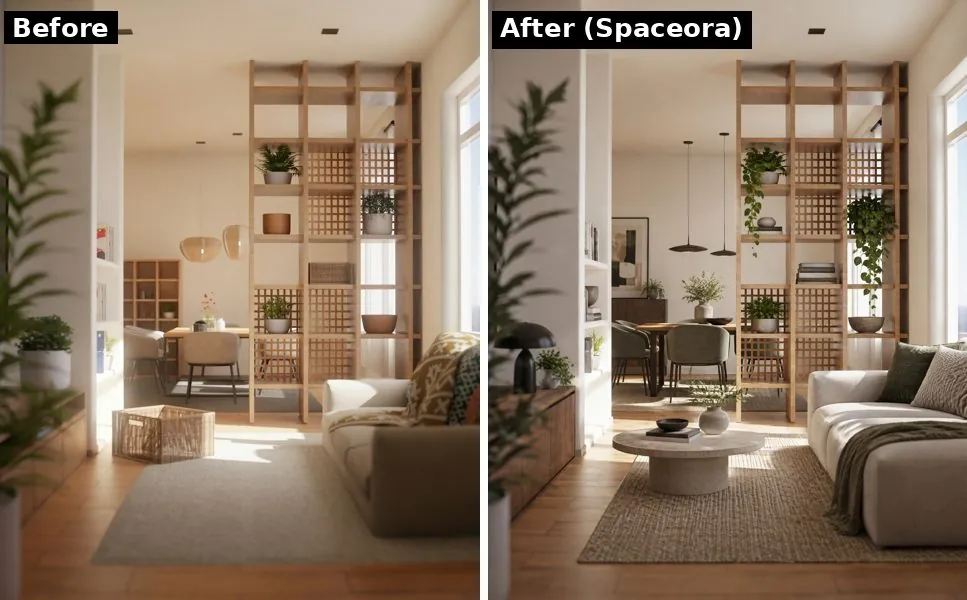
Before and after: Spaceora, Modern style, single run. Photo: Puscas Adryan / Unsplash
We'll show you the results rather than promise them. Compare the walls, windows and room divider in the two versions and judge for yourself. Like any AI tool, Spaceora can still change details you didn't ask about, which is why your 3 free redesigns are worth spending on your hardest photo.
Edit in plain words
On paid plans, you can ask for a change in a sentence ("warmer lighting", "keep the rug", "swap the coffee table for something round") instead of rolling a brand-new image. The free tier doesn't include these edits; it regenerates the whole image each time.
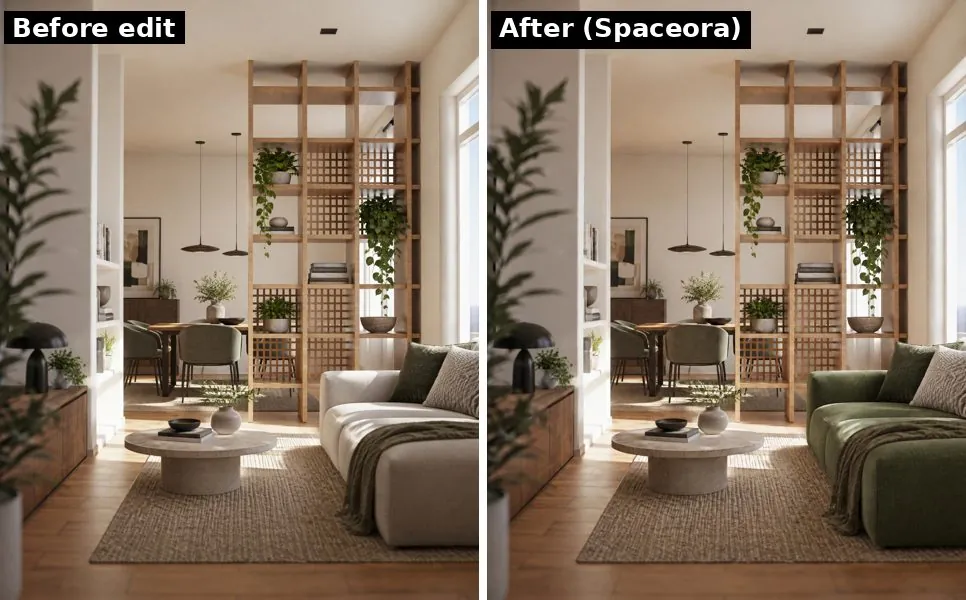
One plain-words edit on the redesign above: "Make the sofa green." Photo: Puscas Adryan / Unsplash
Virtual staging for listings
Upload an empty room and get it furnished for your listing photos at spaceora.app/virtual-staging. You own the images and can use them commercially on any plan, including free. Two things to know:
- You have to label staged photos as virtually staged. NAR's Standard of Practice 12-5 and many MLS rules expect it, and Spaceora's terms require it.
- Free images carry a watermark you can't remove.
If you're weighing this against hiring a stager, see our breakdown of virtual staging cost vs. traditional staging.
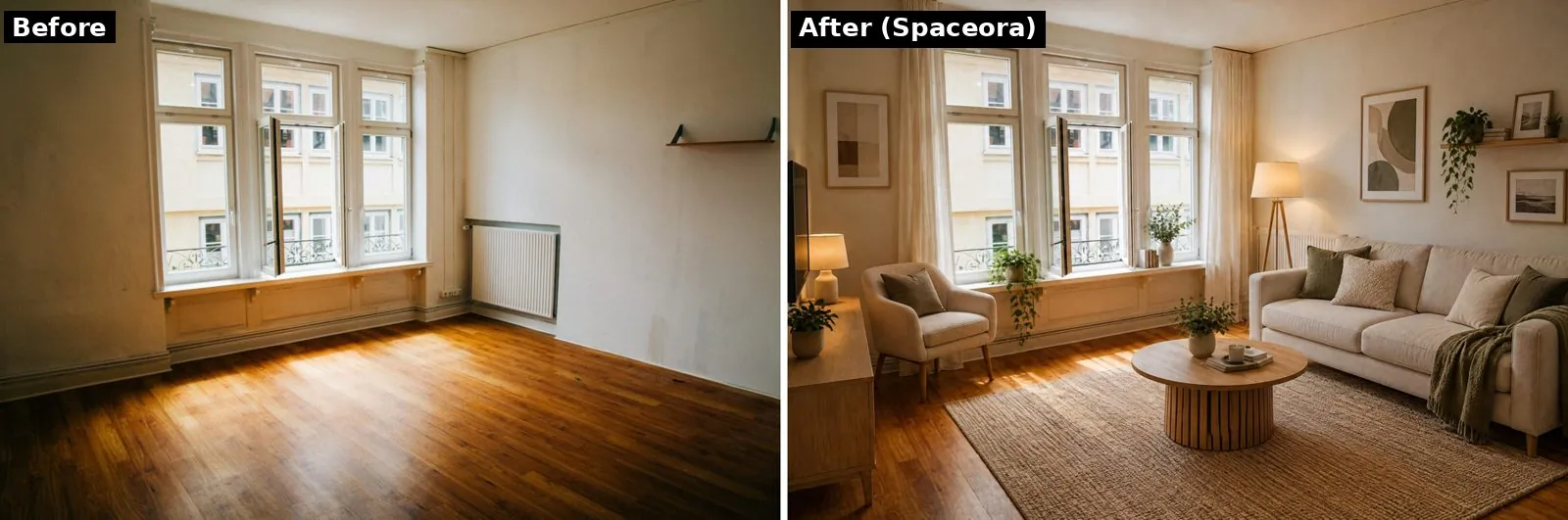
Before and after: Spaceora virtual staging, Modern style, single run. Photo: Christian Lue / Unsplash
Yards, gardens and landscapes, matched to your zone
This is the part RoomGPT skips entirely. Several tools here have outdoor modes; Spaceora's difference is plant suggestions matched to your climate. Spaceora handles backyards, gardens and full landscape plans. Plant suggestions are filtered by USDA hardiness zone, so you aren't shown a lemon tree for a Minnesota yard. Not sure of your zone? The free hardiness zone finder looks it up from your ZIP code.
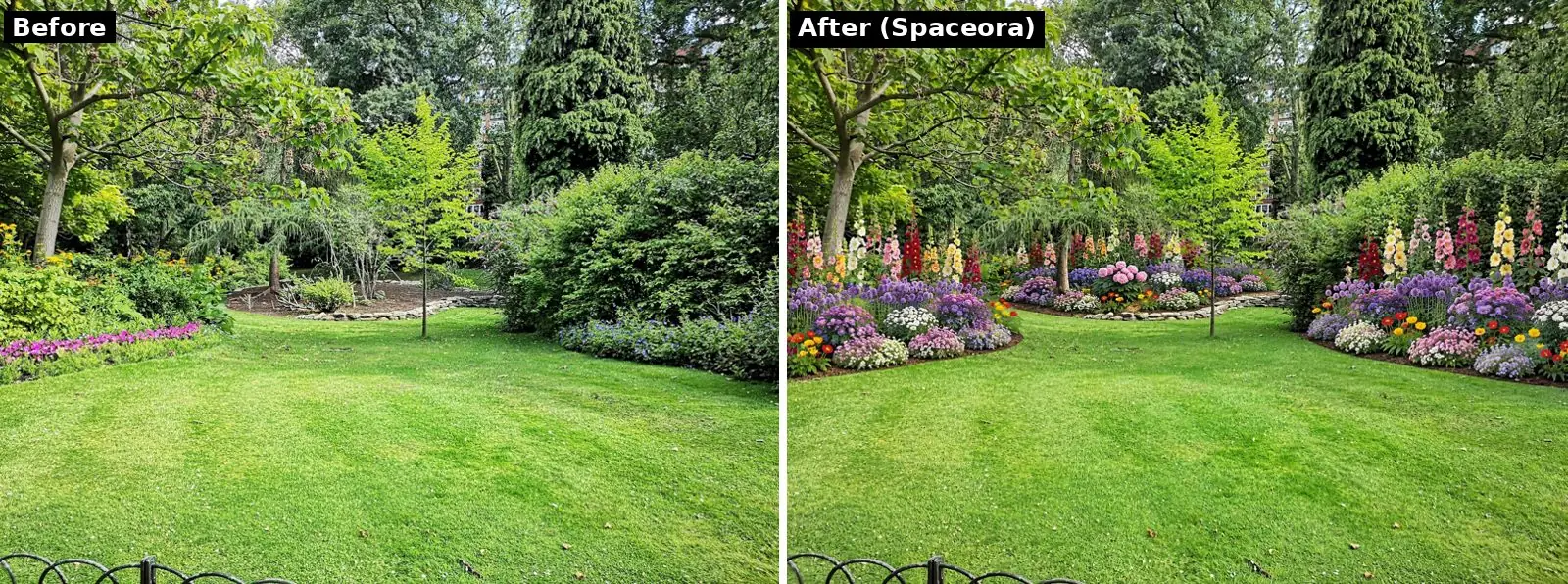
Before and after: Spaceora garden design, Modern style, example inputs ZIP 10001, 20 × 30 ft, full sun. Photo: Pankaj Shah / Unsplash
Pricing
| Plan | Monthly | Generations per month | Output |
|---|---|---|---|
| Free | $0 | 3 free redesigns when you sign up, not monthly | 1248×832, watermarked |
| Lite | $19.90 | 30 | 2K (2352×1568) |
| Pro | $39.90 | 80 | Around 4K (3520×2352) |
| Max | $79.90 | 120 | Around 4K, highest quality |
Each new generation uses 10 credits, and plain-words edits are available on paid plans. Paying yearly takes 25% off (Lite $179.10, Pro $359.10, Max $719.10 per year). There's no one-time purchase; it's free or a subscription. A generation takes about a minute. Failed or timed-out generations refund their credits automatically. Full details on the pricing page.
Where it falls short
- The free tier is small. You get 3 free redesigns when you sign up (see the pricing page). They don't refill monthly.
- You have to sign in before your first generation (Google sign-in works).
- Free images are watermarked with a tiled brand mark, and free output is 1248×832, which is fine for a phone screen but small for print.
- No edits on free. Plain-language edits need a paid plan.
- No pay-per-room option. If you only ever need one room, RoomGPT's $9 pack is cheaper than a month of Lite.
- Web only. It works in a mobile browser, but there's no dedicated app to download.
- Your photo goes to a third party. Spaceora sends photos to its image-generation provider, WaveSpeed, to create the render. Spaceora stores your images in its own storage and you can delete them, but it can't delete the provider's copy. Skip uploads you'd rather keep private.
Verdict: the best pick if you may need staging or outdoor design later. For one cheap render of one room, RoomGPT's smallest pack costs less.
2. Interior AI: most styles and modes
One of the earliest AI redesign tools, with 55+ styles and modes for staging, sketches and outdoor spaces. Best if style variety matters most.
Downside: no free plan is listed, editing and staging need the Premium plan, and there are no refunds.
Pricing: Pro $49/month, Premium $99/month, Ultra $199/month; Pro is $390 billed yearly (as of Oct 2026).
3. REimagineHome: best free trial for staging
A redesign and staging tool for homeowners and agents. Its 5 free designs make it a good first stop for testing staging on listing photos.
Downside: editing without starting over needs the Pro plan, and outdoor support is basic landscaping only.
Pricing: $14 to $99/month across four plans, 1 credit per design (as of Oct 2026).
4. Collov AI: listing staging
A staging specialist for agents who stage listings regularly.
Downside: the 5-staging free trial is watermarked, and it's built for listings more than remodel planning.
Pricing: Standard $19/month billed yearly ($228); chat editing starts on the $49/month plan (as of Oct 2026).
5. Spacely AI: designers and commercial use
A rendering tool for designers who need client presentations, with 40 free trial credits and landscape, auto-furnish and edit tools.
Downside: more tool than most homeowners need for one room.
Pricing: Personal, Studio and Agency plans, plus top-ups from $9 for 200 credits (as of Oct 2026).
6. MeltFlex and Roomellow: furniture you can actually buy
Most AI redesigns show furniture that doesn't exist. These two fix that.
- Roomellow gives you 1 free (watermarked) render and links pieces to a catalog of 65,000+ products from 40+ retailers. Paid packs start at $4.99 for 10 renders, and credits never expire (as of Oct 2026).
- MeltFlex focuses on shoppable designs; check its site for current free options and outdoor support.
Downside: small free tiers and fewer pure design options. Use them when you're ready to buy.
7. Planner 5D and IKEA Kreativ: when you need real measurements
Planning tools, not one-click redesigns.
- Planner 5D builds a floor plan and 3D model with real dimensions, and has a garden and landscape planner. There's a free version.
- IKEA Kreativ is free and lets you place IKEA products in a scan or photo of your room.
Downside: more setup and less photoreal. Pair one with an AI tool when you need to know the sofa fits.
RoomGPT vs alternatives: comparison table
| Tool | Edit after render | Outdoor / garden | Virtual staging | Free option | Paid from (as of Oct 2026) | Best for |
|---|---|---|---|---|---|---|
| RoomGPT | No | No | No dedicated mode | Yes | $9 (30-credit pack) | One quick concept |
| Spaceora | Yes (paid plans) | Yes, zone-matched plants | Yes | 3 free redesigns when you sign up, watermarked | $19.90/mo | Rooms, listings and yards in one place |
| Interior AI | Yes (Premium plan) | Yes (outdoor mode) | Yes (Premium plan) | None listed | $49/mo | Style variety |
| REimagineHome | Yes (Pro plan) | Basic landscaping | Yes | 5 designs | $14/mo | Trying staging free |
| Collov AI | Yes ($49 plan) | Lawn, season and twilight edits | Yes | 5 watermarked stagings | $19/mo (billed yearly) | Listing staging |
| Spacely AI | Yes (Auto Edit) | Yes (Creative Landscape) | Yes (Auto Furnish) | 40 credits | $9 top-up (200 credits) | Designers |
| Roomellow | No | Outdoor room type | No | 1 render | $4.99 (10 renders) | Shoppable furniture |
| Planner 5D | Yes (manual) | Garden planner | No | Free version | See site | Floor plans |
How much of the room stays recognizable: Test any tool on your own photo before paying; see our Spaceora before-and-after results above.
Is RoomGPT worth it in 2026?
Yes, for one specific job: a fast themed concept of a single room when you don't need edits or outdoor work. Credits never expire and there's no subscription to cancel. At a reported $9 for 30 credits, it's one of the cheapest ways to get a handful of paid renders.
It's a weaker fit if you need to adjust details, stage listings often, or plan a yard. One more warning: the "RoomGPT" apps on the App Store are not made by roomgpt.io. They're separate products; the top "RoomGPT" listing, from Hbrothers L.L.C., sells a $9.99 weekly subscription (as of Oct 2026). If you were charged weekly, that's probably where it came from.
FAQ
What is the best RoomGPT alternative?
For most homeowners, Spaceora. It redesigns rooms from one photo, lets paid users request edits in plain words, and also covers virtual staging and yard, garden and landscape design with plants matched to your USDA zone. You get 3 free redesigns when you sign up; paid plans start at $19.90/month.
Is RoomGPT free?
Partly. New accounts can try it free, then you buy credit packs: $9 for 30, $19 for 100, $29 for 200 (as reported by third-party reviews, Oct 2026; RoomGPT shows prices only after sign-in). Third-party reviews report that default quality uses 2 credits per image.
Which RoomGPT alternative is free?
Spaceora (3 free redesigns when you sign up, watermarked), REimagineHome (5 designs), Collov (5 watermarked stagings), Spacely (40 trial credits), Roomellow (1 render), plus IKEA Kreativ and Planner 5D's free version for planning. Interior AI lists no free plan.
Why does RoomGPT change my windows and walls?
Image models redraw the whole picture, and they sometimes redraw structure along with furniture. Every tool here can do it to some degree. The reliable fix is to test your own photo in two or three tools and keep the one whose output still looks like your room.
What are the best RoomGPT alternatives for real estate virtual staging?
Spaceora, REimagineHome and Collov AI. Whatever you use, label the photos as virtually staged; NAR Standard of Practice 12-5 and most MLS rules expect it.
Is there an AI tool like RoomGPT for backyard and garden design?
Yes. RoomGPT is indoor only. Interior AI, Spacely and REimagineHome have outdoor modes, and Spaceora redesigns backyards, gardens and landscapes from a photo and filters plant suggestions by USDA hardiness zone, which you can look up from your ZIP code.
Are the App Store RoomGPT apps the same as roomgpt.io?
No. They're made by other developers, and the top listing sells a weekly subscription. roomgpt.io is a website that sells one-time credit packs.
Does Spaceora have a mobile app?
No dedicated app. It runs in your phone or computer browser.
How long does a Spaceora redesign take?
About a minute.
Try it on your own room
Don't pick a tool from screenshots, including ours. Take the photo of the room you actually want to change and run it through Spaceora's AI interior design tool (you get 3 free redesigns when you sign up). Then try the same photo in one other tool from this list and keep whichever result still looks like your home.
Comparing other design tools too? See our Ideal House alternatives guide.