Can AI Design a Room Layout?
Learn when an AI room image is enough and when you need a measured layout. Compare inputs, outputs, limits, and the handoff between the two workflows.
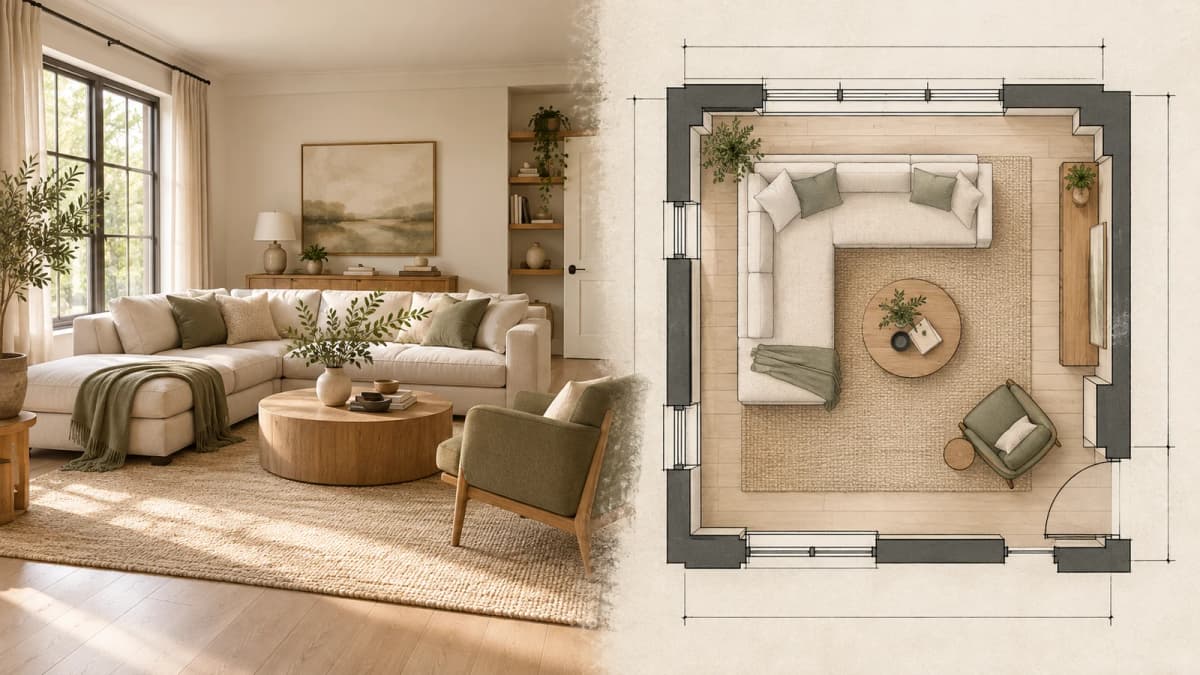
Cover: editorial illustration created October 27, 2026, not a Spaceora test result or a verified plan.
TL;DR
AI can help with two different layout jobs. A photo generator can show a visual arrangement or style direction, while a planning tool can represent walls, openings, furniture, and dimensions you enter. Use the photo workflow for ideas; use a measured plan when the question is whether something fits or how people will move through the room.
Direct answer: AI can suggest a room layout, but a generated room image is not a measured layout. If placement, clearances, or ordering furniture depend on inches or centimeters, measure the room and enter those dimensions into a planning tool. You can use the resulting plan as a constraint when creating a visual concept, but verify both against the real space.
The word “layout” causes confusion because it can mean a believable picture, an editable plan, or construction documentation. Those outputs require different inputs and support different decisions.
What kind of layout do you need?
Choose the output before choosing the tool.
| Your question | Use first | Why |
|---|---|---|
What could this room feel like in a different style? | Photo-based AI concept | Fast visual direction for color, materials, and broad arrangement |
| Could the sofa face the window instead? | Photo concept, followed by measurements | Useful for exploring the idea; measurements decide whether it fits |
| Will this exact sofa fit beside the door? | Measured layout | Requires room, opening, furniture, and clearance dimensions |
| Where should doors and windows appear in the plan? | Measured layout | Their positions affect circulation and usable wall space |
| Can I move a wall? | Qualified design/construction process | A generated image or consumer plan does not establish structural feasibility |
Which arrangement should I show a contractor or designer? | Measured plan plus written assumptions | A shared reference is useful, but it is not permit or construction documentation |
Spaceora is a photo-concept tool. It can help you compare a visual direction from a room photo, but it does not turn that photo into a dimensionally verified interior plan.
What inputs does a photo concept need?
A photo workflow needs a clear image, the room type, the visual goal, and a list of features to keep. Include doors, windows, main furniture, and visible floor when possible.
Useful inputs include:
- one level photo from a corner or doorway;
- the main task, such as changing style or exploring another furniture arrangement;
- furniture and fixed features that should remain;
- one or two allowed changes;
- a short note about the room's use.
Open Spaceora's AI interior design tool when you need a visual concept from a photo. The result can help you discuss mood, finishes, furniture categories, or a broad arrangement. It cannot confirm clearances or exact product fit.
What inputs does a measured layout need?
A measured layout starts with numbers and positions rather than visual resemblance.
Record:
- room width and depth, plus wall segments in irregular rooms;
- door width, position, and swing direction;
- window width, sill height, and position along the wall;
- radiators, vents, outlets, built-ins, columns, and steps;
- furniture width, depth, and height;
- routes that need to stay open;
- the measurement unit and any assumptions.
Planner 5D is one example of the measured-planning category. Its current official help pages say users can add predefined or drawn rooms, position doors and windows, and enter wall measurements in centimeters or inches. Its documentation also describes changing dimensions for rooms, walls, openings, furniture, and supported items. Those pages establish the availability of dimension inputs; they do not prove that Spaceora performed a Planner 5D test or that every catalog item is free on every platform.
What can you trust in each output?
Treat each output according to the evidence behind it.
| Output | Reasonable use | Verify separately |
|---|---|---|
| AI room image | Compare atmosphere, color families, materials, and broad placement ideas | Dimensions, preserved features, exact products, color samples, feasibility |
| User-entered floor plan | Compare arrangements against the dimensions entered | Measurement accuracy, door swing, irregular geometry, site conditions |
| Furniture rectangles or models | Test approximate footprints and clearances | Manufacturer dimensions, recline or extension space, delivery route |
| Render from a measured plan | Communicate a direction while keeping the plan as reference | Construction details, finishes, lighting behavior, code or permit requirements |
An attractive render can still be wrong. A precise-looking plan can also be wrong if the measurements or opening positions are wrong.
Which workflow should you use?
Use a photo concept when the decision is visual
Choose the photo route when you want to compare two styles, explore a warmer palette, see whether a lighter rug changes the room, or discuss a broad furniture direction. It is useful early, when the decision is “Which direction should we develop?”
Use a measured layout when the decision is spatial
Choose the plan route when you need to know whether a sofa fits, whether a chair blocks a door, or how much room remains around a table. This workflow takes more setup because you must measure the space and the items.
Use both when appearance and fit matter
A practical sequence is:
- Generate one or two photo concepts to identify a useful direction.
- Extract only the layout ideas worth testing.
- Measure the room, openings, and relevant furniture.
- Rebuild those ideas in a measured planner.
- Reject any arrangement that does not preserve circulation or access.
- Use the plan and concept together when asking for feedback.
The photo helps people understand the look. The plan records the assumptions that determine fit.
How do you hand a concept to a planner or designer?
Create a short handoff rather than sending an unexplained AI image.
Room-layout handoff checklist
- Source photo: date and viewpoint.
- Room measurements: unit, wall lengths, ceiling height if relevant.
- Openings: door and window positions, widths, and swing.
- Fixed elements: fireplace, radiator, outlets, built-ins, or columns.
- Furniture to keep: item name and measured width, depth, and height.
- Concept idea: the one arrangement or design direction being tested.
- Must-keep route: minimum access around doors and through the room.
- Unknowns: anything not measured or verified.
- Decision needed: for example, “Can two chairs fit without narrowing the path?”
Do not describe the AI image as the measured source. The plan should be built from actual measurements, and the image should remain a visual reference.
Example: can a reading chair fit beside the window?
A photo concept may show a chair and lamp beside the window. That answers “Could this look good?” It does not answer “Will it fit?”
For the measured check:
- Measure the wall segment between the window and adjoining feature.
- Record the chair's full width and depth.
- Include any radiator, curtain, outlet, or door interference.
- Mark the required walking route.
- Add the chair footprint to the plan.
- Test the real footprint with tape or cardboard before ordering.
If the plan works, return to the concept for material and color choices. If it does not, keep the lighting or color idea and discard the implied placement.
What should you never infer from an AI room image?
Do not use a generated photo as evidence that:
- a product has a particular size;
- a passage meets a required clearance;
- a wall can be removed or moved;
- a door or window can be relocated;
- an electrical, plumbing, or ventilation change is feasible;
- the room meets code or permit requirements.
Those decisions need measurements and, where relevant, qualified professional review.
Start with the decision you need to make
Use Spaceora when you need to compare a visual direction from a photo. Use a measured planning workflow when the answer depends on exact dimensions. For a general photo-based decorating process, read How to Use AI to Decorate a Room From a Photo.
Frequently asked questions
Can AI make a floor plan from a room photo?
Some products advertise photo or scan-based planning, but a single generated room image is not a dimensionally verified floor plan. Check how the specific product collects and validates measurements before relying on the result.
Can Spaceora tell me whether furniture will fit?
No. Spaceora creates photo-based visual concepts. Measure the room and the exact furniture, then use a planning method that preserves those dimensions.
What measurements do I need for a room layout?
Start with wall lengths, door and window positions, fixed obstacles, and furniture footprints. Add heights, swings, extension space, and delivery routes when they affect the decision.
Is an editable 2D or 3D plan construction-ready?
Not by default. It can support planning and communication, but construction, structural, code, and permit decisions require the appropriate documentation and review.
Should I make the plan or the AI image first?
For early style exploration, the image can come first. If you are buying furniture or changing placement, measure and test the plan before treating the visual concept as actionable.
Sources and illustration note
- Planner 5D: dimensions and measurement units, accessed October 27, 2026.
- Planner 5D: adding a room, accessed October 27, 2026.
The cover is an editorial illustration created October 27, 2026. It is not a Spaceora test result, a measured plan, or evidence of furniture preservation.