6 Best AI Room Design Tools (2026): Photo vs Planner
Redesign a room from a photo or plan it to scale? We compare 6 AI room design tools for 2026: Spaceora, Planner 5D, Homestyler, RoomSketcher and more, with prices checked October 2026.
TL;DR
Photo-first (see your own room restyled):
- Spaceora: best overall for seeing your own room, and your yard, redesigned from one photo in about a minute. 1 free redesign when you sign up; paid plans from $19.90/month.
- HomeDesigns AI: the most modules in one place (interiors, exteriors, gardens, floor plans on its top plan). Trial terms are unclear.
- DecorAI: one flat monthly price, reported as unlimited images. Good if you render a lot.
Plan-first (measure and check what fits):
- Planner 5D: best free room planner, with no time limit on the free plan.
- Homestyler: free 3D planning in the browser with a huge model library.
- RoomSketcher: best for accurate floor plans with measurements you can print to scale.
The short answer
The best of the AI room design tools for most people in 2026 is Spaceora if you're starting from a photo, and Planner 5D if you're starting from measurements. Spaceora shows your actual room in a new style in about a minute. Planner 5D tells you whether the sofa fits. Most people get the best result by using one of each: pick the look first, then check the sizes.
These AI room design tools split into two kinds, and most lists mix them up. A photo-first room designer takes a picture of your room and repaints it in a new style. A plan-first room planner builds a floor plan or 3D model from your dimensions. The first is faster for deciding on a look. The second is the one you trust before you order a bed frame.
This guide covers three of each, what's free, what it costs, and a simple workflow for using them together. If you're mostly comparing photo restyle apps, our guide to the best AI interior design tools covers that ground.
AI room design tools at a glance
Competitor prices are as of October 2026 and change often; confirm each one on the vendor's pricing page before you pay.
| Tool | Type | Starts from | Free option | Paid from | Measurements | Outdoor / yard | Platforms | | -------------- | ----------- | ------------------------ | ---------------------------------------------- | -------------------------------------------------------------------------- | ------------------------------------------- | -------------------------------------------------------------------------------- | ------------------------------- | | Spaceora | Photo-first | Photo | 1 free redesign when you sign up (watermarked) | $19.90/mo | No | Yes, yards and gardens from a photo, plants matched to your ZIP code's USDA zone | Web browser only | | HomeDesigns AI | Photo-first | Photo | Unclear; free tool pages only | Reported ~$22/mo as of Oct 2026; confirm at homedesigns.ai | 2D→3D floor plan on top plan (vendor claim) | Exteriors and gardens | Web browser | | DecorAI | Photo-first | Photo | Reported 1-day trial, card required | Reported ~$24/mo as of Oct 2026; confirm at decorai.io | No | Check vendor site | Web browser | | Planner 5D | Plan-first | Floor plan | Free plan, no time limit | $19.99/mo or $59.99/yr as of Oct 2026; confirm at planner5d.com/pricing | Yes | Some outdoor items | Web, Windows, Mac, iOS, Android | | Homestyler | Plan-first | Floor plan | Free Basic plan | Pro intro price reported; renewal unclear, confirm at homestyler.com | Yes | Limited | Web browser and apps | | RoomSketcher | Plan-first | Floor plan or plan image | Free plan with a few credits | $12/mo (billed yearly) as of Oct 2026; confirm at roomsketcher.com/pricing | Yes, to scale | Limited | Web and desktop, offline use |
Photo-first or plan-first? Four questions to decide
Before you open any AI room design tools, ask yourself four questions:
- Do I already know the style I want? No: start photo-first. Seeing your own room in three styles settles it faster than any mood board.
- Am I buying furniture this month? Yes: you need a plan-first tool. A picture can't confirm a 90-inch sofa fits between two doors.
- Do I want to install anything? No: Spaceora, HomeDesigns AI, DecorAI and Homestyler all run in a browser.
- Does the project continue outside? Yes: Spaceora redesigns backyards and gardens from a photo with the same account, and its free Hardiness Zone Finder looks up your USDA zone.
Two "photo" answers and you're a photo-first person. Two "plan" answers, start with a room planner. Mixed answers are normal; skip to the workflow section.
How we chose these AI room design tools
We read the top-ranking lists of AI room design tools and kept tools that show up repeatedly, publish pricing, and do one job clearly. Three are photo-first and three are plan-first, so you can compare like with like.
We ran our own renders only in Spaceora, on October 21, 2026, using free Pexels photos, Lite-tier settings (2K, no watermark) and a single run per image. We don't show screenshots or output from the other tools; their entries below are text only, and we'd rather point you to their sites than show images we can't vouch for.
Photo-first AI room designers
Photo-first AI room design tools answer one question: what would my room look like in a different style? You upload a photo, choose a style, and get a new image. None of them measure anything.
1. Spaceora: best for seeing your own room (and yard) redesigned
Spaceora is a browser app that redesigns a room from one photo. Upload a picture of your bedroom or living room, pick a style like Modern, Japandi or Scandinavian, and the redesign arrives in about a minute. There's nothing to install, and you can sign in with Google.
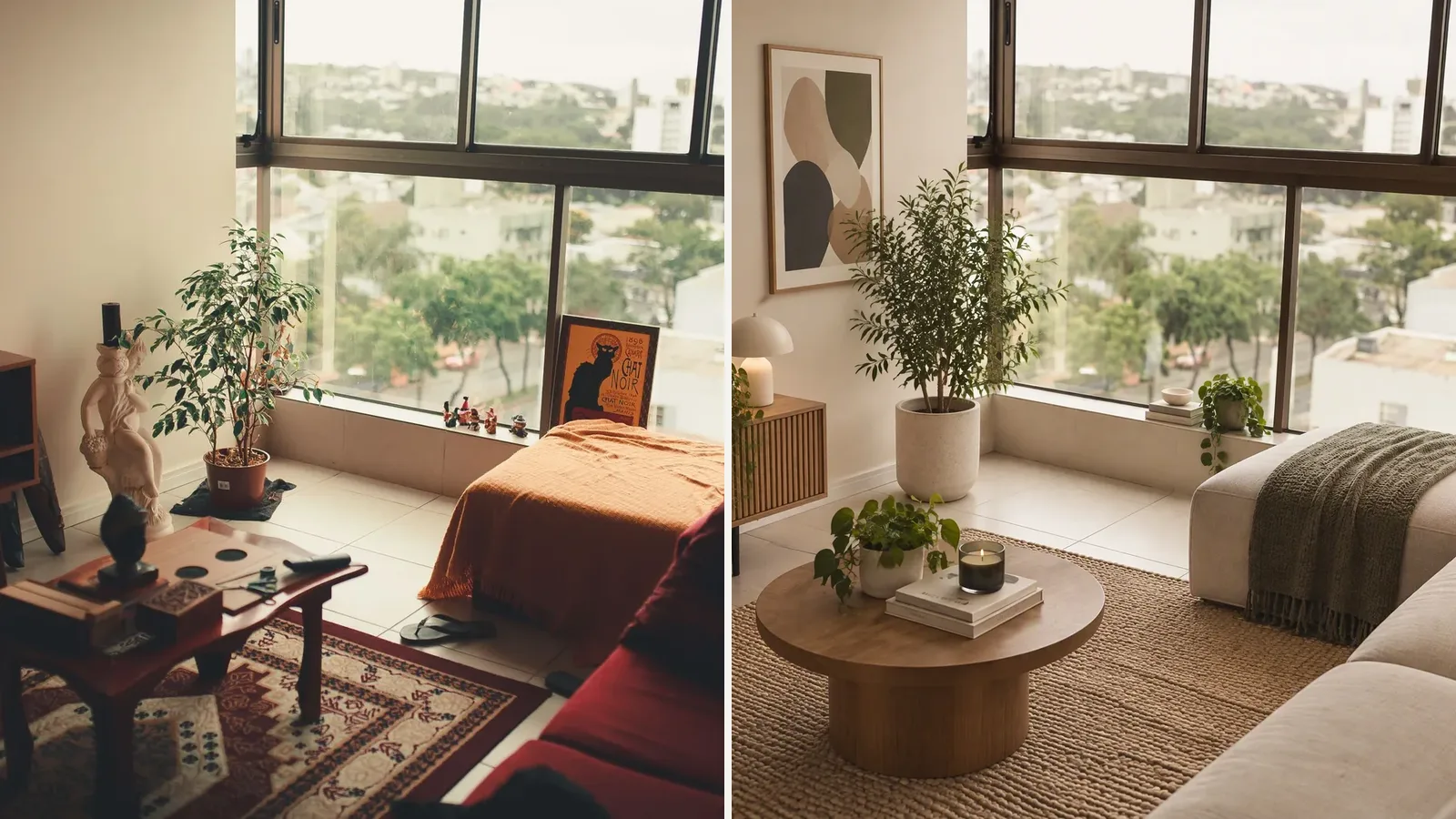
Living room, Modern style:
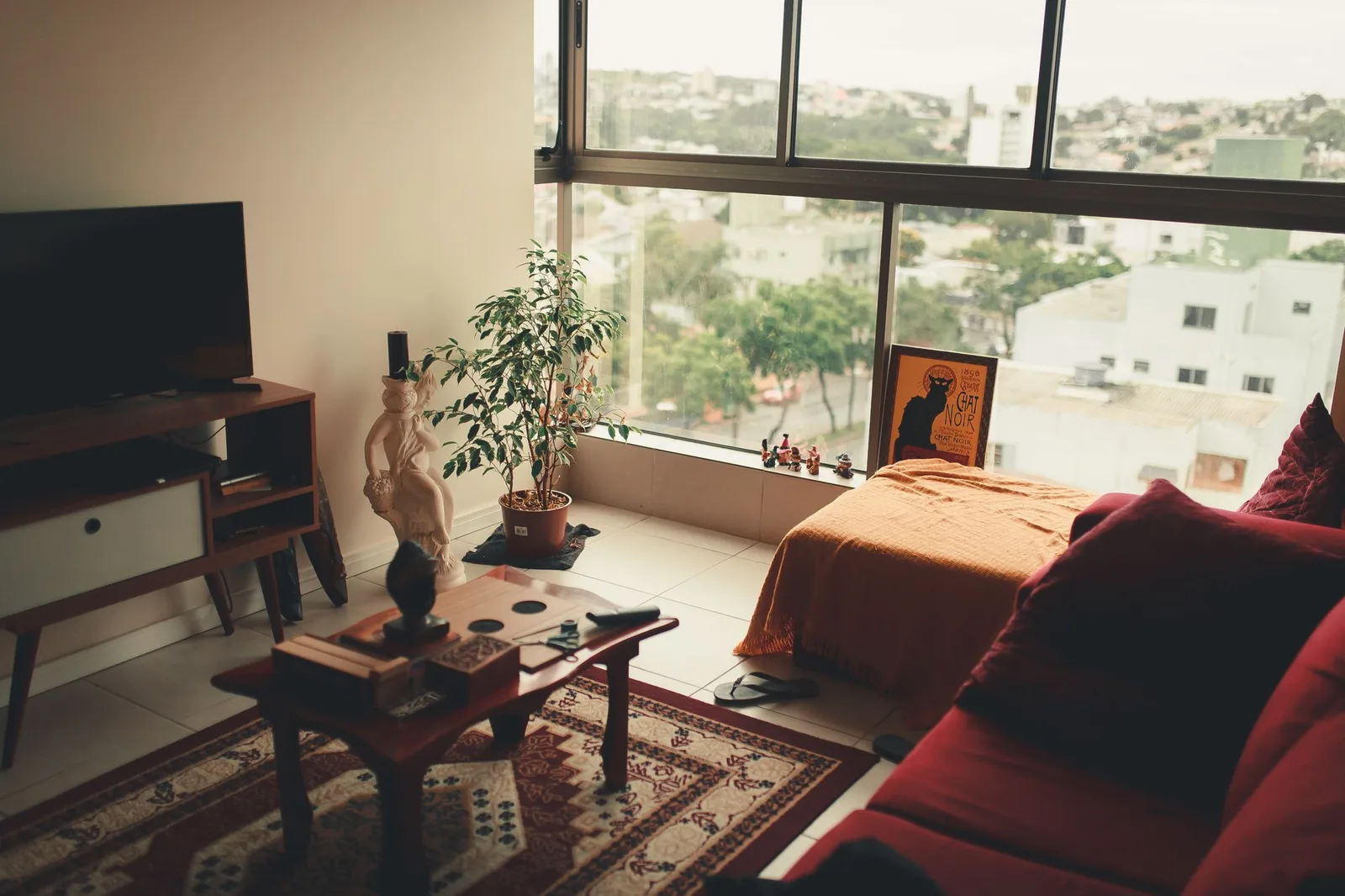 Before: original living room photo (Fabio Lange / Pexels).
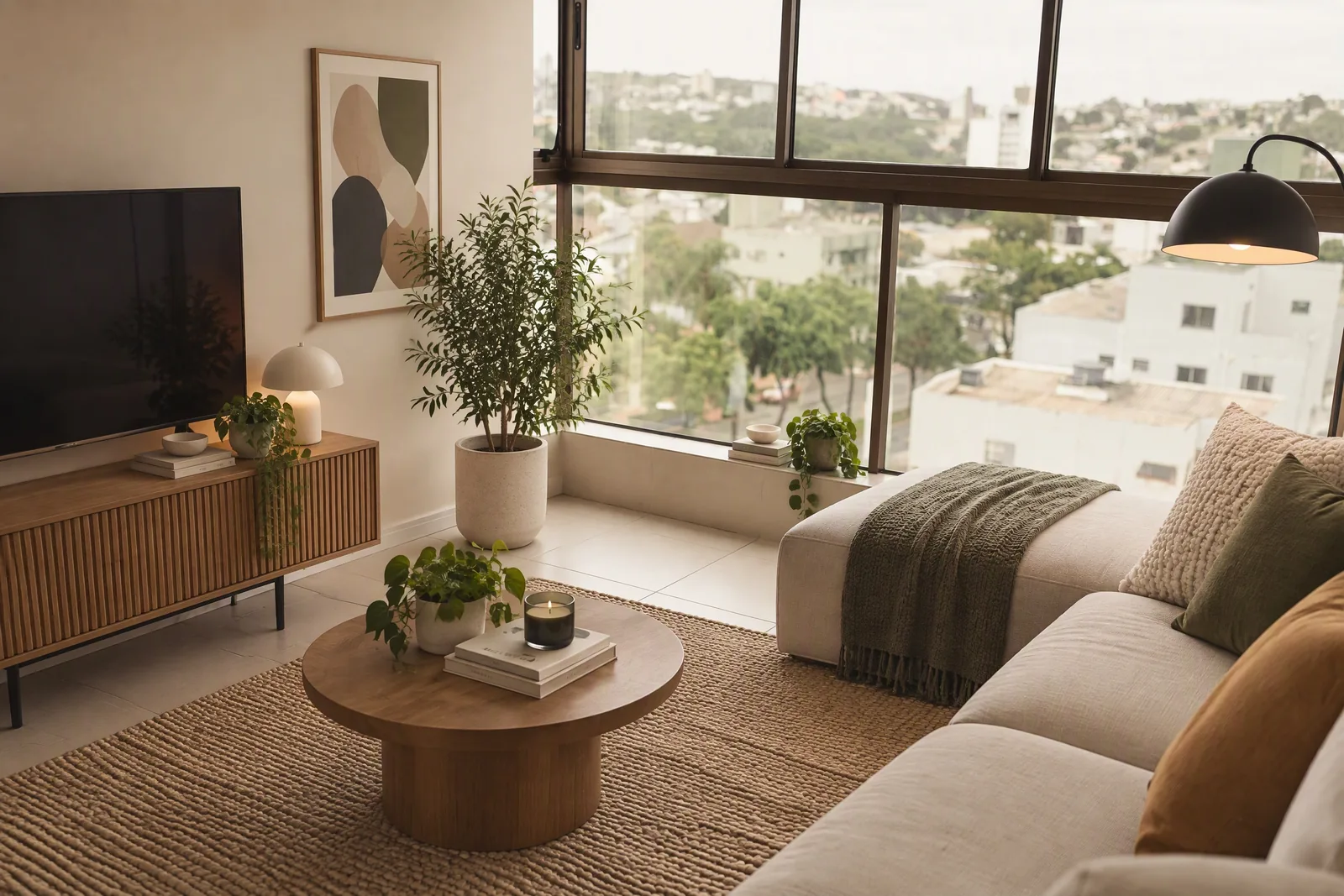 After: Spaceora, Lite tier, Modern style, single run, generated October 21, 2026. Photo: Fabio Lange / Pexels.
Compare the windows, walls and floor in both photos and judge for yourself. Like any AI image tool, Spaceora can change details you didn't ask about, so spend your free redesign on your hardest photo.
Bedroom, Japandi style:
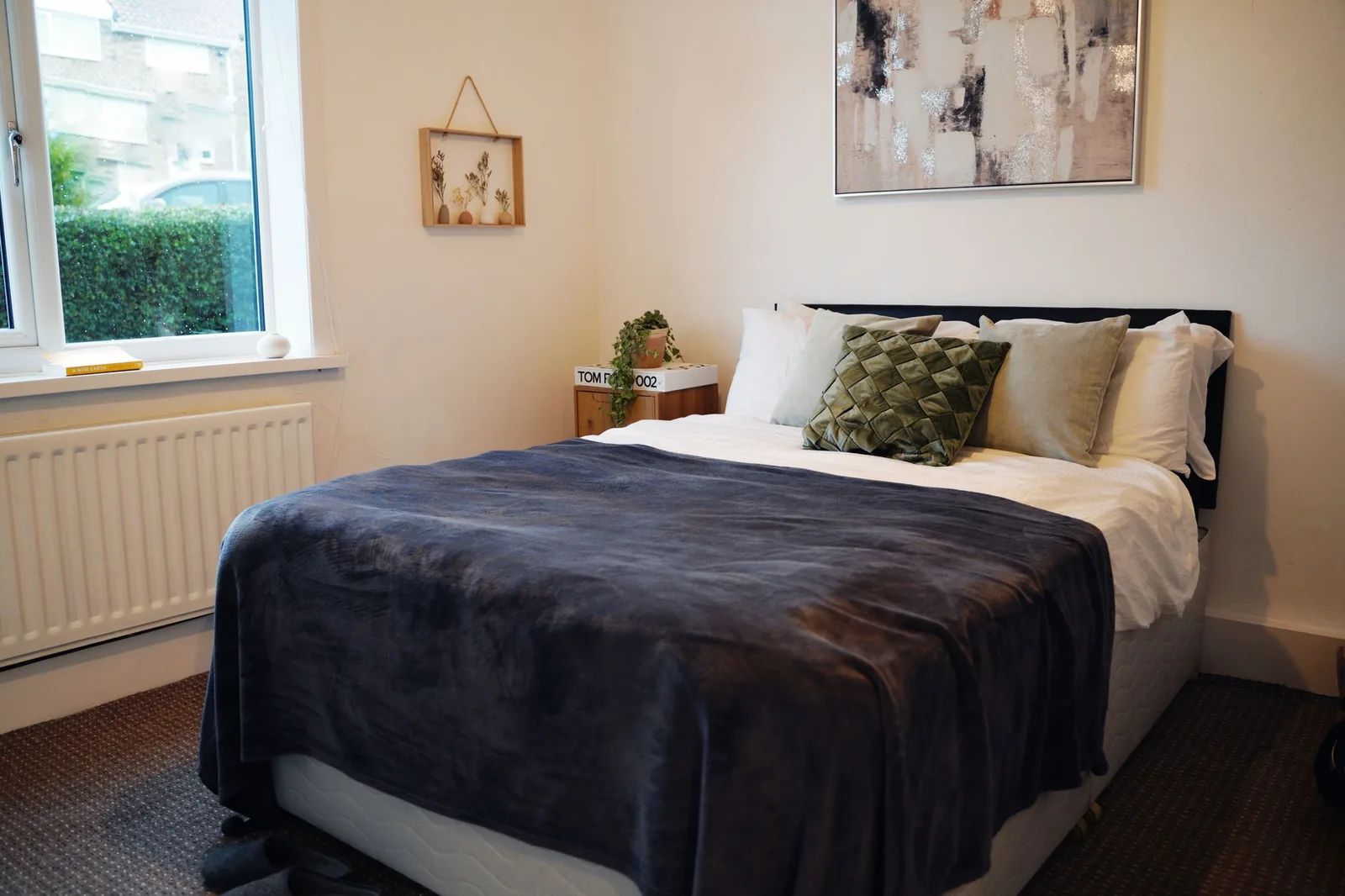 Before: original bedroom photo (Cameron Gawn / Pexels).
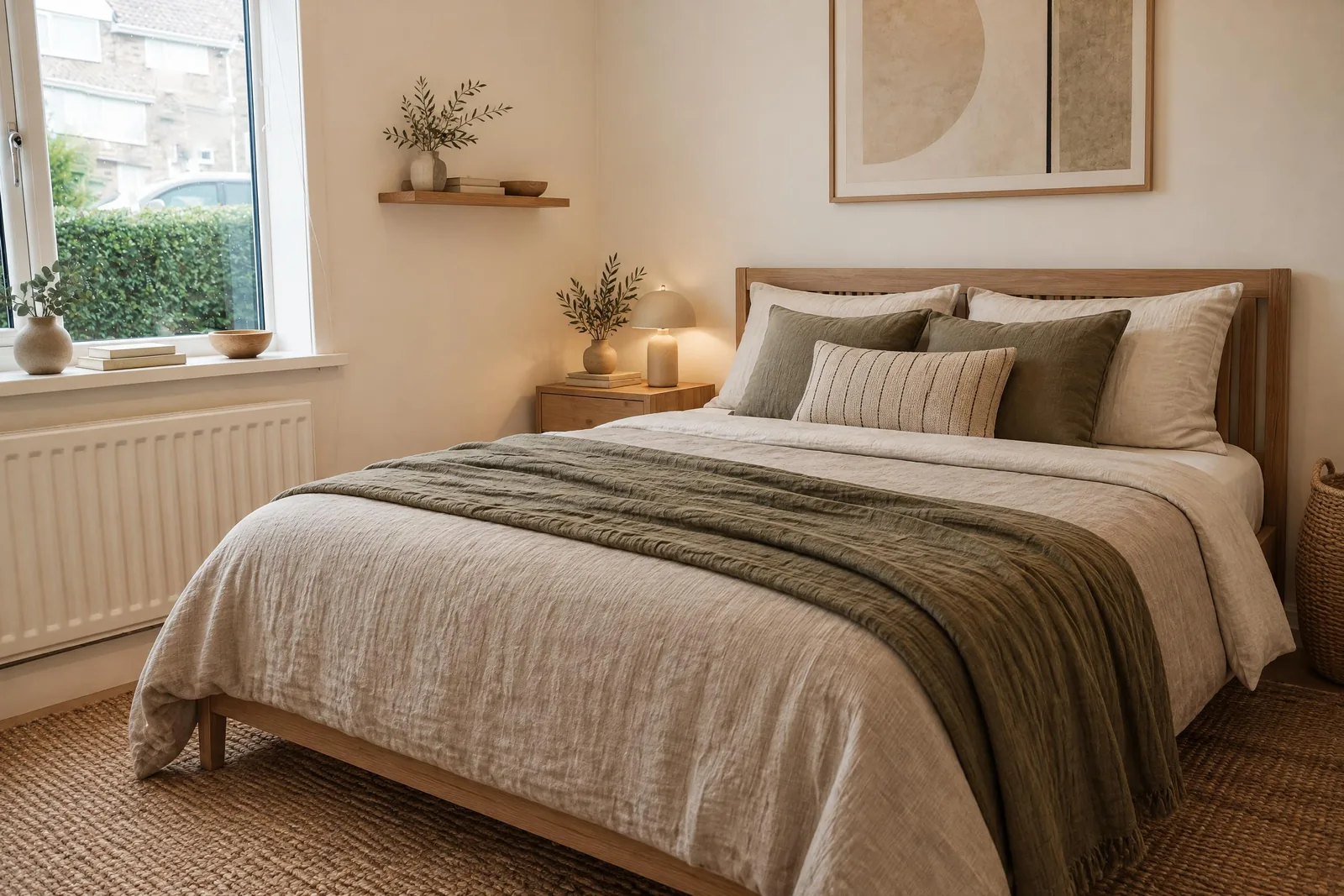 After: Spaceora, Lite tier, Japandi style, single run, generated October 21, 2026. Photo: Cameron Gawn / Pexels.
For style starting points, browse bedroom design ideas, small bedroom design or modern bedroom design.
Kitchen, Scandinavian style:
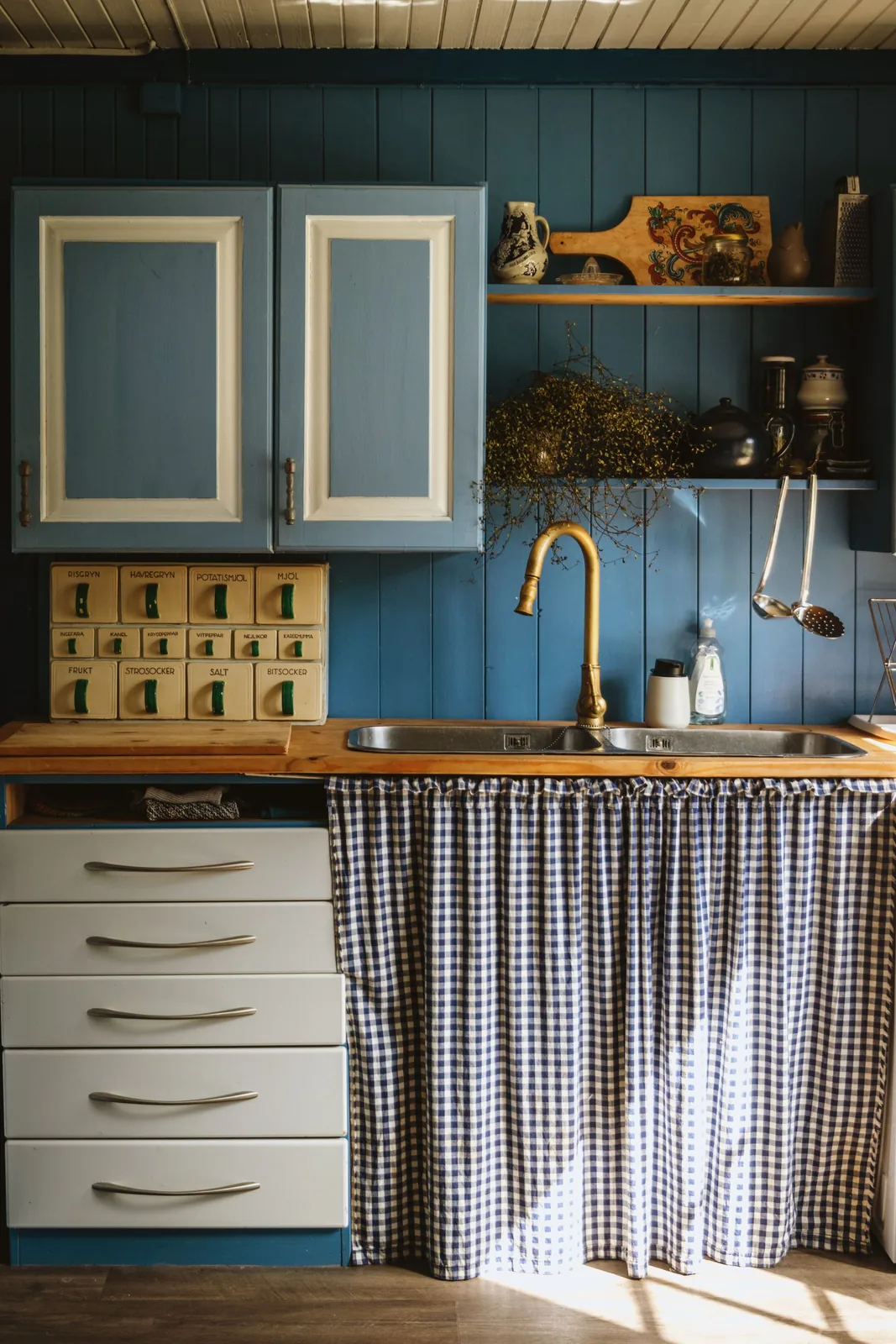 Before: original kitchen photo (Laura Meinhardt / Pexels).
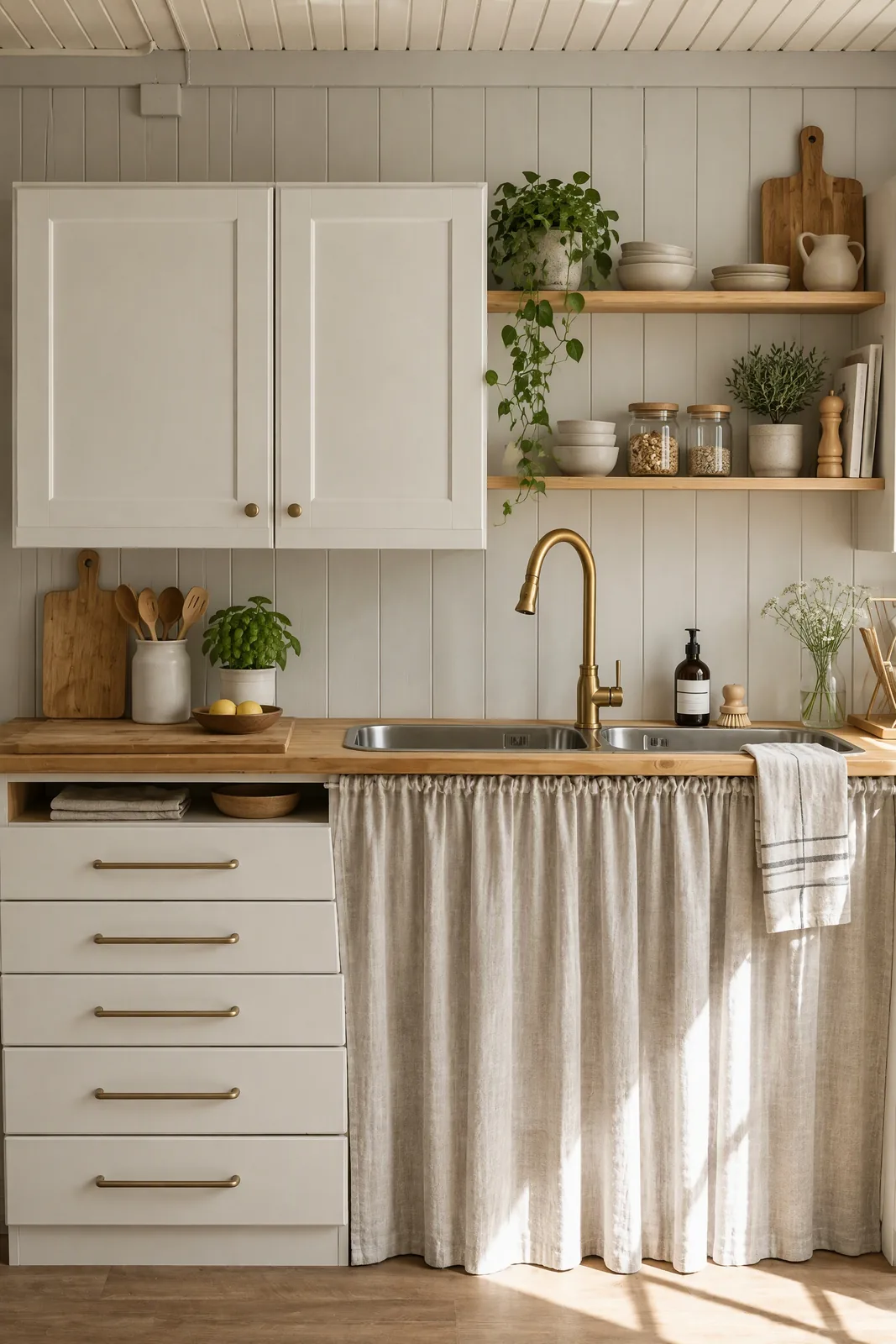 After: Spaceora, Lite tier, Scandinavian style, single run, generated October 21, 2026. Photo: Laura Meinhardt / Pexels.
Edit in plain words (paid plans). On a paid plan you can ask for one change in a sentence, like "make the sofa green", instead of starting over. The free tier can't edit; any change reruns the whole image.
The yard, too. The same account redesigns backyards and gardens from a photo, with plants matched to the USDA hardiness zone for your ZIP code. The free hardiness zone finder shows that zone; check your final plant list with a local nursery.
Pricing:
| Plan | Monthly | Redesigns per month | Output | | ---- | --------- | -------------------------------------------------------- | -------------------------------- | | Free | $0 | 1 free redesign when you sign up (one-time, not monthly) | Watermarked | | Lite | $19.90 | 30 | 2K | | Pro | $39.90 | 80 | Around 4K | | Max | $79.90/mo | 120 | Around 4K, best quality we offer |
Paying yearly takes 25% off ($179.10, $359.10 or $719.10 per year). It's subscription only; there's no pay-per-room option. You own what you make and can use it commercially on every plan, free included, as long as you don't remove the watermark from free images. See the pricing page.
Limitations:
- No measurements or floor plans. Spaceora shows a look, not dimensions. Pair it with a planner below.
- Web only. It works in a phone browser, but there's no app to download.
- Subscription only. One room still costs a month of Lite if you go past the free redesign.
- No edits on free. On the free tier you regenerate the whole image; one-sentence edits start on Lite.
Verdict: of the photo-first AI room design tools, the best pick when you want to see your own room in a new style tonight, and it carries on into the backyard and garden on the same account.
2. HomeDesigns AI: best for the most features in one place
HomeDesigns AI packs a lot of modules into one photo tool: interior redesign, exteriors, gardens, and on its top plan, 2D-to-3D floor plans and budget estimates. It markets a "Structure-Lock" feature; that's the vendor's claim, and we haven't tested it.
Pricing: as of Oct 2026, third-party roundups list Standard at about $22/month, Pro about $29 and Expert about $37, with discounted first-year annual pricing that rises at renewal. Confirm at homedesigns.ai/pricing. Commercial use reportedly starts on Pro.
Downsides: the free trial terms aren't clearly stated; we could only find free single-tool pages. The cheap annual price is a first-year offer, so budget for the renewal.
Verdict: worth a look if you want floor plans and redesigns under one login and you're fine paying for the top plan.
3. DecorAI: best flat price for heavy use
DecorAI keeps pricing simple: one monthly fee, which third-party reviews describe as unlimited images, with video billed separately in credits.
Pricing: reported at about $24/month as of Oct 2026; confirm at decorai.io before you subscribe, since we couldn't verify the unlimited plan on the vendor's own page.
Downsides: the trial is reported as one day and three designs, and it asks for a credit card. Set a reminder if you try it.
Verdict: a good deal if you'll generate dozens of room designs a month. For one bedroom, the card-up-front trial is a hassle.
AI room planners (layout and measurements)
Plan-first AI room design tools answer a different question: will it fit? You draw or import a floor plan, set dimensions, and place furniture at real sizes. The renders look less like a photo of your room, but the numbers are real.
4. Planner 5D: best free AI room planner
Planner 5D is the easiest of the plan-first AI room design tools to learn. It lets you draw a room in 2D and walk through it in 3D. Its free plan has no time limit and, as of Oct 2026, no project cap, with roughly half the furniture catalog unlocked.
Pricing: Premium is $19.99/month or $59.99/year, and Professional $49.99/month or $399.99/year, as of Oct 2026; confirm at planner5d.com/pricing. Premium adds the full catalog (10,000+ items), floor plan recognition and monthly AI Studio credits.
Downsides: we couldn't confirm exactly what AI Studio produces per credit. The free catalog is enough to block out a room, but you'll notice missing pieces.
Verdict: the best place to start if you've never used a room planner. It's also the only tool here with apps on every major platform.
5. Homestyler: best free 3D planning in the browser
Homestyler is a browser-based 3D floor planner with a very large model library (100,000+ items, per third-party reviews) and a set of AI tools, including an AI planner, stager and painter, that share AI credits.
Pricing: the free Basic plan reportedly includes unlimited 1K renders. Paid Pro and Master plans exist, but the price sources we found disagree, and Pro appears to be a first-month intro offer. Confirm the renewal price at homestyler.com before you subscribe. 4K renders are reportedly bought separately.
Downsides: pricing is hard to pin down, and the interface takes some learning if you've never used 3D software.
Verdict: the strongest free 3D option for people willing to spend an evening learning it.
6. RoomSketcher: best for accurate floor plans
Of the plan-first AI room design tools, RoomSketcher is the most focused on floor plans. Its AI Convert feature turns an image of a floor plan into an editable project, and paid plans add measurements, area calculations and printing to scale.
Pricing: free plan with 2 credits and one AI floor-plan conversion. Pro is $12/month ($144/year) and Team $35/month ($420/year), as of Oct 2026; confirm at roomsketcher.com/pricing.
Downsides: it's about layout, not style. Your renders won't look like your actual room.
Verdict: the pick if you have a floor plan from your landlord or builder and need exact numbers for a contractor or a furniture order.
The workflow that works: photo-first, then measure
The smartest way to use AI room design tools is in order. Style first, then fit.
- Photograph the room in daylight, from a corner, with as much of the floor visible as you can.
- Run it through Spaceora in two or three styles. Keep the one you'd actually live with.
- Note the big pieces in that image: bed, sofa, rug, shelving.
- Open Planner 5D or RoomSketcher, enter your room's dimensions, and drop in furniture at the sizes you plan to buy.
- Adjust if something blocks a door or a walkway, then shop.
Using two AI room design tools this way takes an evening, not a weekend, and it catches the classic mistake: falling for a look that needs a bigger room than yours.
Designing more than one room (and the yard)
Most projects don't stop at one room, and most AI room design tools stop at the door. With Spaceora, the same account and plan cover the bedroom, the living room and the backyard, so you're not juggling a separate subscription for outdoor work. Browse Japandi or Scandinavian bedroom ideas to keep a consistent style across rooms. If you're furnishing an empty listing instead, Spaceora also does virtual staging. And if you came here from RoomGPT, see our RoomGPT alternative guide.
Frequently asked questions
What is the best AI room design tool in 2026?
For most people redesigning a room from a photo, Spaceora. You upload a photo, pick a style and get a redesign in about a minute in your browser, and the same account also redesigns yards and gardens from a photo, with a free Hardiness Zone Finder to look up your zone. You get 1 free redesign when you sign up, and paid plans start at $19.90/month. If you need exact measurements or a floor plan, pair it with a room planner such as Planner 5D.
Is there a free AI room planner?
Yes. Planner 5D's free plan has no time limit and includes about half its furniture catalog. Homestyler has a free Basic plan, and RoomSketcher's free plan includes one AI floor-plan conversion. For a photo-based redesign instead of a plan, Spaceora gives 1 free redesign when you sign up, and you can use it commercially as long as the watermark stays.
Can AI design my room from a photo?
Yes. Photo-first AI room design tools like Spaceora, HomeDesigns AI and DecorAI take a photo of your room and show it in a new style. Results can change details you didn't ask about, so compare the result with your real room before you buy anything.
AI room designer vs room planner: what's the difference?
An AI room designer, like Spaceora, starts from a photo and shows your room in a new style, which is the fastest way to decide on a look. An AI room planner, like Planner 5D, Homestyler or RoomSketcher, starts from a floor plan and measurements, so you can check whether furniture fits. Use a designer to choose the style, then a planner to confirm sizes.
Which AI room design tool works in the browser without an app?
Spaceora runs only in the browser, including on a phone, with nothing to install. HomeDesigns AI, DecorAI, Homestyler and Planner 5D also work in a browser; Planner 5D adds desktop and mobile apps.
Can I use AI room designs commercially?
It depends on the tool. Spaceora allows commercial use on every plan, free included, as long as you don't remove the watermark from free images. HomeDesigns AI reportedly starts commercial use on its Pro plan. Check each tool's terms before you use images for clients or listings.
Can the same tool design my backyard?
Spaceora can. It redesigns backyards and gardens from a photo, with plants matched to the USDA hardiness zone for your ZIP code. HomeDesigns AI also covers gardens and exteriors. The room planners here focus on indoor layouts.
Start with a photo of your room
Don't pick between AI room design tools from screenshots. Take a photo of the room you want to change and run it through Spaceora's AI design tool; your first try is on the house, since you get 1 free redesign when you sign up. Once you like a look, open a room planner and check the sizes before you buy. That's the whole method.