Best Free AI Kitchen Design Tools (2026): Same Kitchen, Every Tool
We ran the same kitchen photo through every free AI kitchen design tool we could. What each one kept, what it changed, and what 'free' really gets you.
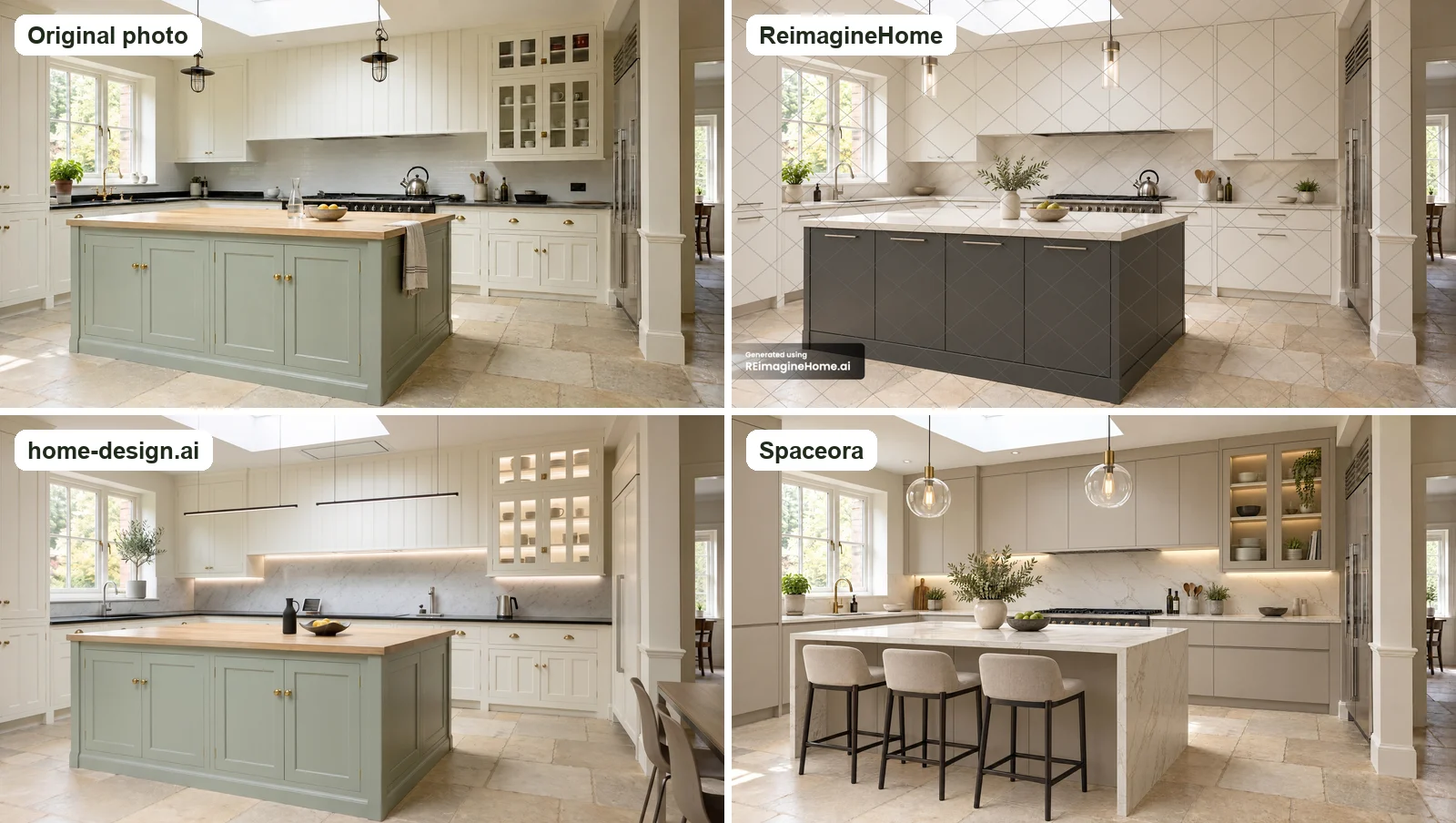
Spaceora is our own product, and it is one of the tools in this test.
TL;DR
- ReimagineHome: the most free images with no account (5 designs), but a watermark covers the whole picture.
- home-design.ai: enough free credits for one high-res image after a Google sign-up.
- Spaceora (ours): one free image per account, with a watermark. Like ReimagineHome, it kept the layout, range and fridge. It changed the style more, and our result (run on a paid account) had no watermark across the image.
- RoomGPT: not tested. The free credit was not enough to render.
- Remodel AI: not tested. Phone app only.
The best free AI kitchen design tool depends on what you want from the free part. If you want to try several looks without signing up, ReimagineHome gives you the most. If you want a clean image, the free tiers we saw either add a watermark or give you only one image. Prices and free allowances below are as of Nov 23, 2026.
We took one kitchen photo, picked a Modern style, and ran it through each tool on the same day. This page shows what each tool kept, what it changed, and exactly what you get for free.
Quick picks by use case
There is no overall winner here. Pick by what you need:
- Try a few looks with no account: ReimagineHome. 5 free designs, no sign-up, but designs are not saved and the image is watermarked.
- One image without a visible watermark: home-design.ai. We saw no watermark on our result. Free credits covered one image.
- Keep the layout and appliances: ReimagineHome and Spaceora both kept the range, fridge and layout in our test.
- A bigger style change on the same layout: Spaceora. One free image per account, and the free image is watermarked.
What "free" really means
Every tool here says "free." Here is what that meant on each site on Nov 23, 2026.
| Tool | Free allowance (as of Nov 23, 2026) | Sign-up needed | Watermark | Tested Nov 23, 2026 | | --------------- | ---------------------------------------------------------------------------------------------------------- | -------------- | ---------------------------------------------------------------------------------- | --------------------- | | ReimagineHome | "5 free designs. No sign-up or payment required." 1 credit per image. Designs not saved without an account | No | Yes, diagonal pattern over the whole image plus "Generated using REimagineHome.ai" | Yes, about 32 seconds | | home-design.ai | 4 credits at sign-up. Pro model (2K) costs 4 credits, so 1 free image | Yes, to upload | None seen on our result | Yes, about 40 seconds | | Spaceora (ours) | 1 free generation per account, for life, shared across every tool on the site | Yes | Yes on the free tier (we tested on a paid account, so we did not see it) | Yes, about 56 seconds | | RoomGPT | Page says 1 free generation at sign-up. Account showed 1 credit. Basic 1 credit, Pro 2, Ultra 4 | Yes | Not seen (no image) | No, see below | | Remodel AI | Page says first 3 free, no card needed | Not reached | Not seen | No, phone app only |
Short version: nobody here gives you unlimited clean images for free. You get a handful of watermarked images, or one image, or nothing until you pay.
How we tested
We used one photo of an older kitchen with an island, a skylight, a range and a fridge. Every tool got a Modern style. Where a tool used a chat box instead of a style menu, we typed: "Restyle this kitchen in a modern style. Keep the layout, windows and doors."
We looked at five things: whether the layout and appliances stayed, how real the cabinets and counters looked, speed, the free allowance, and whether you need an account.
Please read the limits before trusting any of this:
- One image per tool. AI results vary run to run. A second try could look different.
- The kitchen photo is a sample image from Spaceora's own tool page. That favors Spaceora. We did not re-test with a different kitchen.
- Spaceora's result was run on a paid team account. The free tier adds a watermark, which our test image does not show.
- Prices and free allowances are what each site showed on Nov 23, 2026. They change often, so check before you sign up.
Side-by-side results
All three results below were tested Nov 23, 2026, with the same photo and a Modern style.
The tools
ReimagineHome
ReimagineHome works like a chat. You upload a photo and type what you want.
Best for: trying a few looks before you make any account.
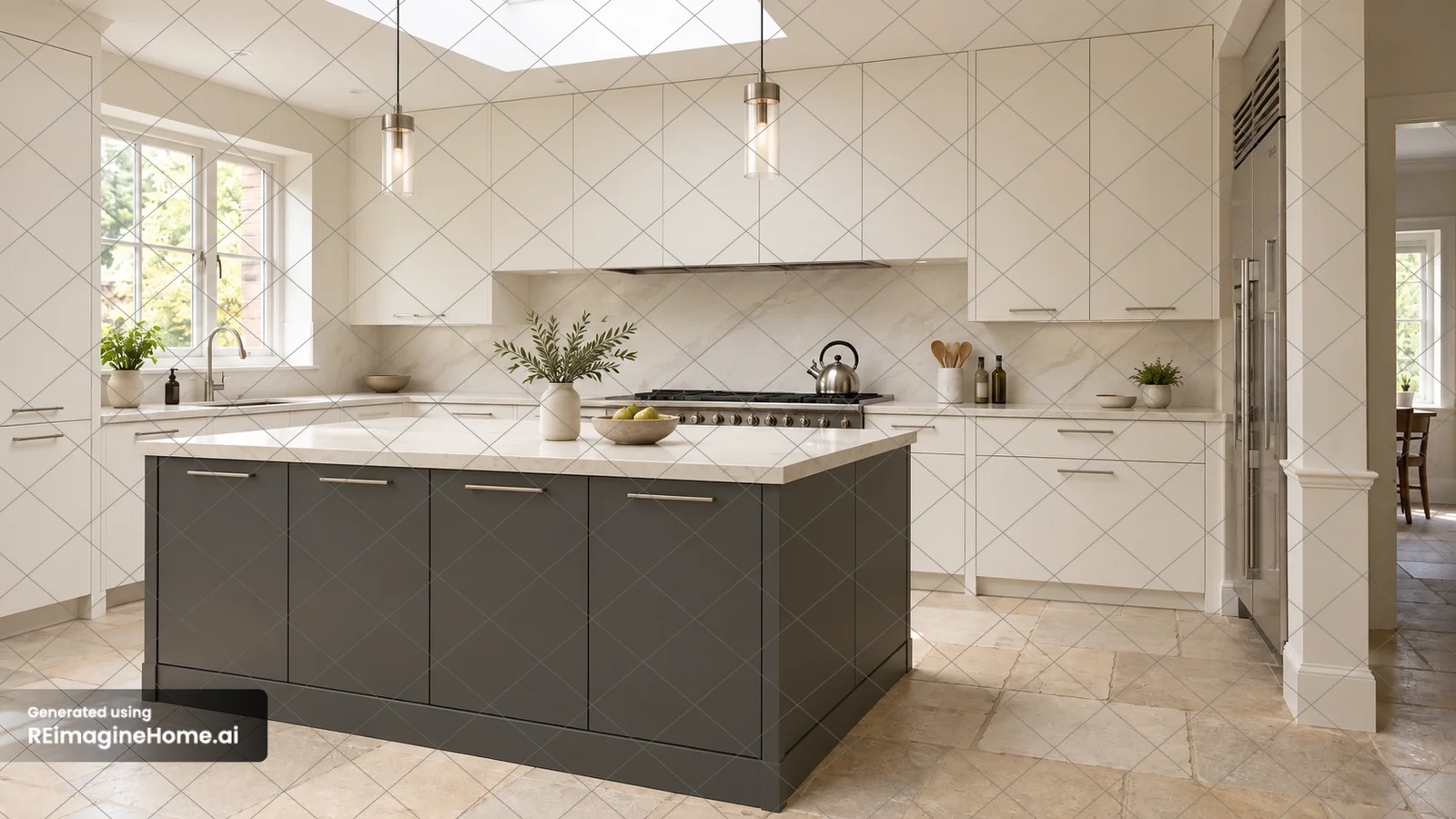
What it kept (tested Nov 23, 2026): the layout, windows, island position, range, fridge, skylight and floor tiles. It changed the cabinet doors, the countertop and the pendant lights. It took about 32 seconds.
Free allowance (as of Nov 23, 2026): the page says "5 free designs. No sign-up or payment required." Each image uses 1 credit. Without an account your designs are not saved.
Downside: a diagonal watermark pattern covers the whole image, and the bottom left says "Generated using REimagineHome.ai." Fine for deciding on a direction, harder to share with someone.
home-design.ai
Best for: one free image with no visible watermark.
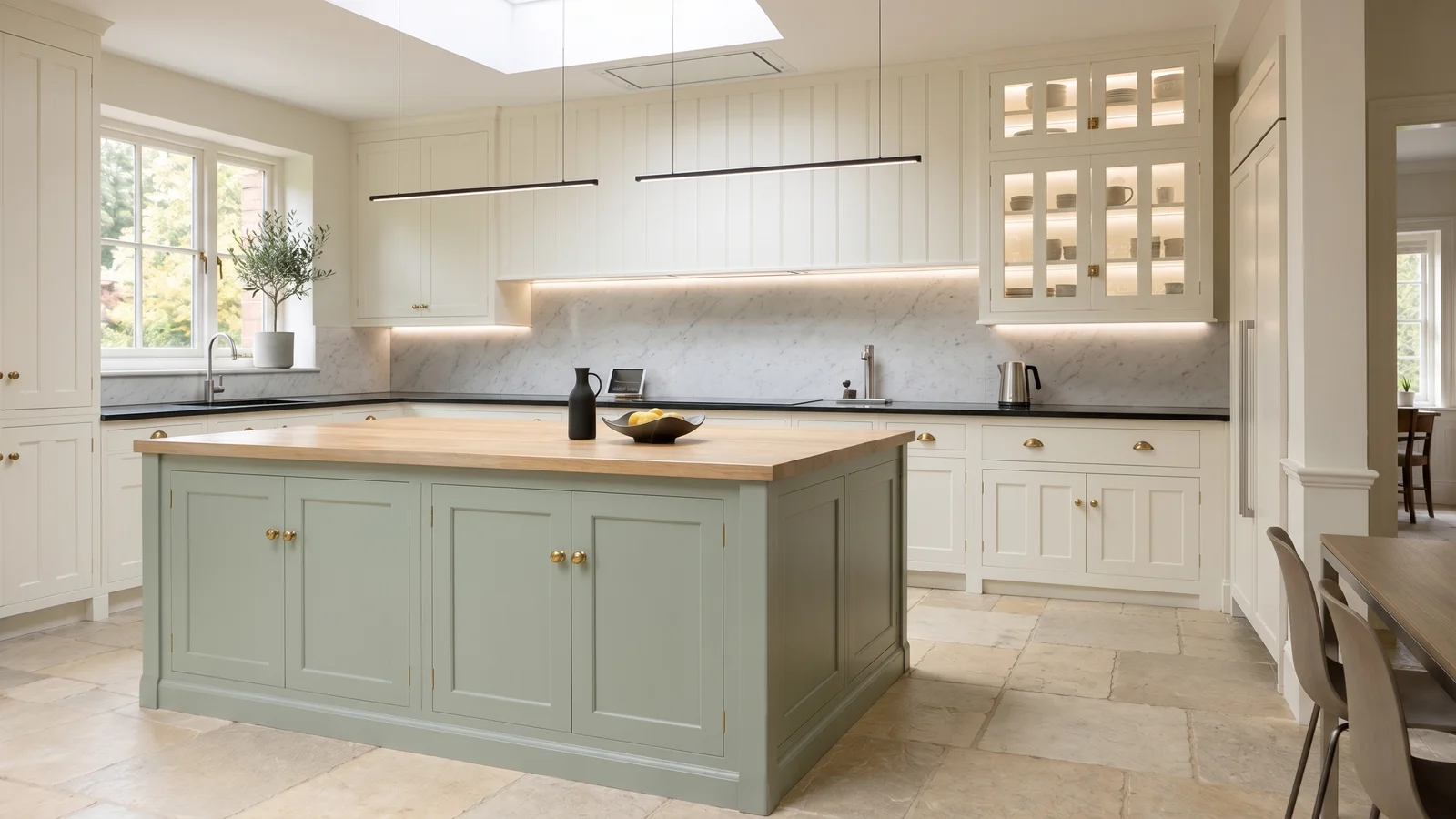
What it kept (tested Nov 23, 2026): the layout, windows, island and skylight. It swapped the pendant lights for long linear lights and the tile backsplash for marble. Where the range was, the image shows a flat cooktop with a tap beside it, and the fridge became a built-in panel door, so the appliances did not stay. The green island, wood top and shaker doors stayed as they were, so the overall style stayed close to the original. It took about 40 seconds.
Free allowance (as of Nov 23, 2026): 4 credits when you sign up. The Pro model (2K) costs 4 credits per image, so you get one free image.
Things to know: you have to sign in before you can upload. After we signed in, a pop-up promoted their "AI Agent."
Spaceora (our tool)
Spaceora's AI kitchen design tool takes a photo of your kitchen and a style you pick from a list. You don't need to write a prompt.
Best for: a bigger change in style while the layout and appliances stay put.
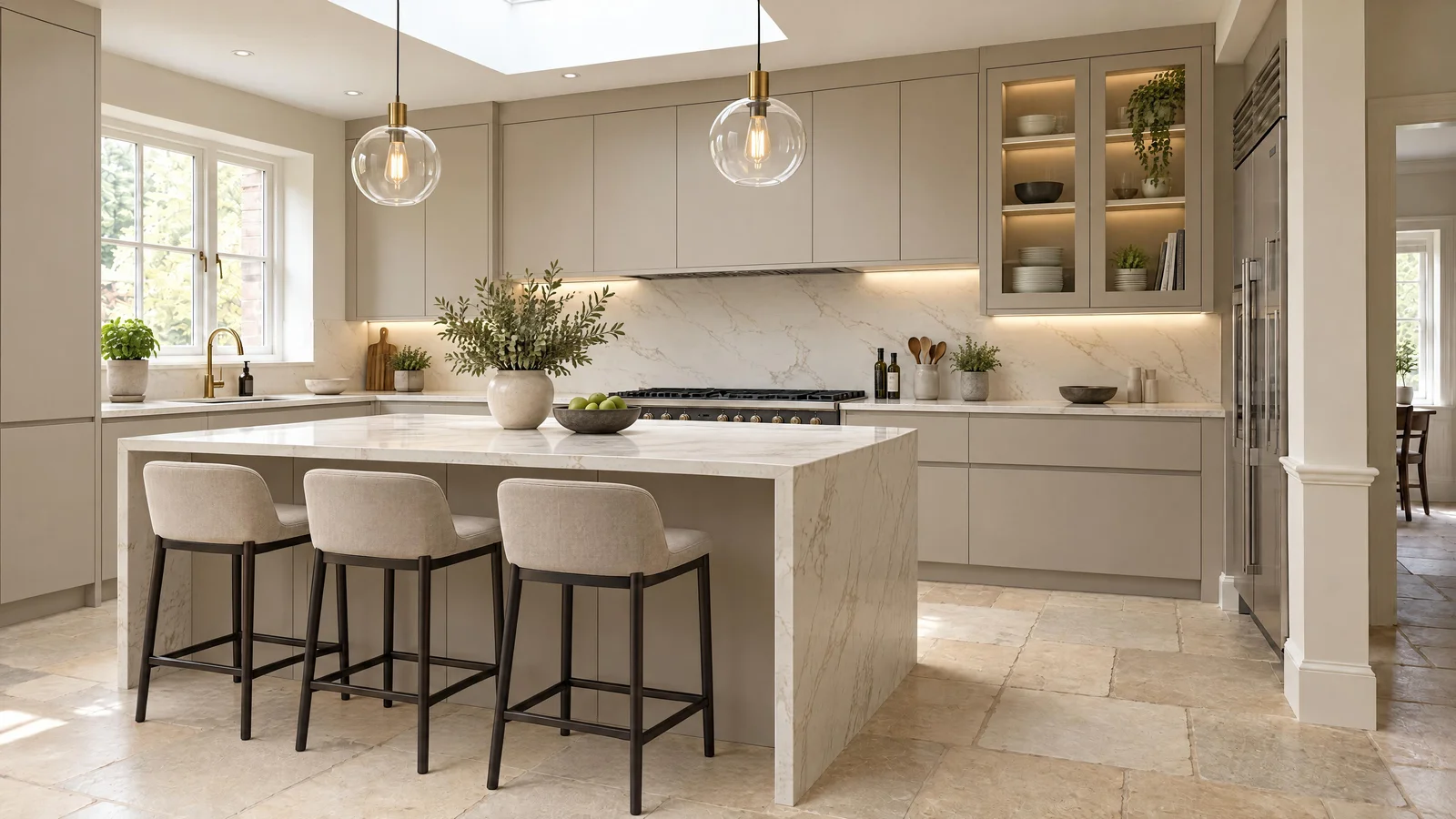
What it kept (tested Nov 23, 2026): the layout, windows, skylight, range, fridge, column and floor tiles. It changed the cabinets, the countertop and the pendants, turned the island into a waterfall counter and added bar stools. It took about 56 seconds. Remember this photo is our own sample image and we ran it on a paid account.
Free allowance (as of Nov 23, 2026): one free generation per account, for life. That one image is shared across every tool on the site, so if you use it on a living room, you have none left for the kitchen. Free images carry a watermark.
Downside: one free image is not much for comparing styles. Editing a single part of the image (for example, just the stools) is not part of the free tier.
RoomGPT: not tested
We signed up with Google. The page said sign-up includes one free generation, and the account showed 1 credit. We picked Basic (1 credit), Kitchen and Modern, then clicked Render. It said "not enough credits. Please buy more." So we have no image to show. On Nov 23, 2026 the Pro option cost 2 credits, Ultra 4 and Basic 1.
Remodel AI: not tested
The site says the first 3 designs are free with no card. Both web links on the site ("Open web app" and "or web app") sent us back to the app download page, so we could not use it in a browser. If you're on a phone, it may be worth a look, but we have nothing to report on results.
Restyle vs re-layout
These are two different jobs, and most lists mix them up.
Restyle means same kitchen, new look: cabinet color, counters, lights, hardware. You keep the walls, plumbing and appliances where they are. Photo-based AI kitchen design tools like the ones above are made for this. You upload a photo and get a picture back in under a minute.
Re-layout means moving things: a new island, a different sink wall, a bigger pantry. That needs real measurements. AI photo tools don't take measurements, so for this you want a planner for laying out by measurements, such as the ones from IKEA or Home Depot.
3D planning apps such as Homestyler and Planner 5D sit in this second group. You build the room in 3D instead of uploading a photo. That's why we left them out of the comparison above. They're a different kind of tool, not a worse or better version of the same thing.
A simple rule: if your question is "what would this look like," use a photo tool. If it's "will this fit," use a planner.
Before you show it to a contractor
An AI image is useful for one thing: showing someone the look you want. Bring it to a kitchen showroom or a contractor and say "this, roughly."
It is not a drawing. The tools above don't know your cabinet depths, your ceiling height or where your gas line runs. In our test, one tool replaced the range with a flat cooktop and a tap, which would be an expensive surprise if anyone took the image literally. Don't use an AI image for measurements or a quote. Use it to start the conversation.
Our take
If you just want to see a few looks for free tonight, start with ReimagineHome and accept the watermark. If you want one image you can send to someone, home-design.ai's free credits cover one. If you want a bigger style change on the same layout, try Spaceora, knowing you get one free image. Want to swap just the furniture in a photo? See replace furniture in a photo.
FAQ
Can AI design my kitchen for free?
Partly. As of Nov 23, 2026, ReimagineHome gave 5 free designs without an account, home-design.ai gave enough credits for 1 image, and Spaceora gives 1 free image per account. The free images from ReimagineHome and Spaceora are watermarked.
Can AI design a kitchen layout?
Not the photo tools we tested. They change how your kitchen looks, not where things go, and they don't use measurements. For a new layout, use a kitchen planner where you enter room sizes.
How do I design my kitchen with AI?
Take a straight-on photo of your kitchen in good light, upload it to a photo tool, and pick a style. Try more than one run if your tool allows it, because results vary. Then take the picture you like to a designer or contractor.
Do free tools add watermarks?
Some do. In our test, ReimagineHome put a watermark over the whole image, and Spaceora's free tier adds one. We saw no watermark on home-design.ai's result. These were the best free AI kitchen design options we could test on Nov 23, 2026.